Category: Queue Management

  • Appointment and Queue Management System: One Dashboard for Both

    Appointment and Queue Management System: One Dashboard for Both

    An appointment and queue management system puts booked customers and walk ins into one live queue that your front desk runs from a single dashboard. If your business takes both, that one change removes most of the daily chaos at the counter. To see why, look at what a normal morning looks like without it.

    A Morning With Two Systems

    Picture a busy salon, clinic or service centre that takes bookings and walk ins. Bookings sit in one place: a booking app, a diary or a WhatsApp chat. Walk ins sit in another: a token machine, a register or a list on a notepad. Here’s how the morning goes.

    • 9:55. Four walk ins are already waiting outside when the doors open. The receptionist hands out tokens 1 to 4.
    • 10:00. The first booked customer arrives for 10:00. Token 1 has been waiting longer. Who goes first?
    • 10:20. A customer calls to book for 10:30. The receptionist checks the booking app, sees the slot is free and takes it, without counting the three walk ins still waiting.
    • 10:30. The 10:30 booking arrives. So does a walk in who asks how long it will be. “About 15 minutes,” says the receptionist, guessing.
    • 10:45. A booked customer doesn’t turn up. The staff member sits idle for ten minutes while the receptionist checks the register to find the next walk in.
    • 11:10. Token 6 tells the desk they have been waiting 40 minutes and someone who arrived later just went in. That someone had a booking. Token 6 doesn’t know that and leaves.
    • 12:30. The owner asks how many customers were served this morning and how long they waited. Nobody knows. The numbers are split across an app, a register and a WhatsApp chat.

    None of this happens because staff are careless. It happens because two systems meet at one desk, and a person has to merge them by hand, again and again, all day.

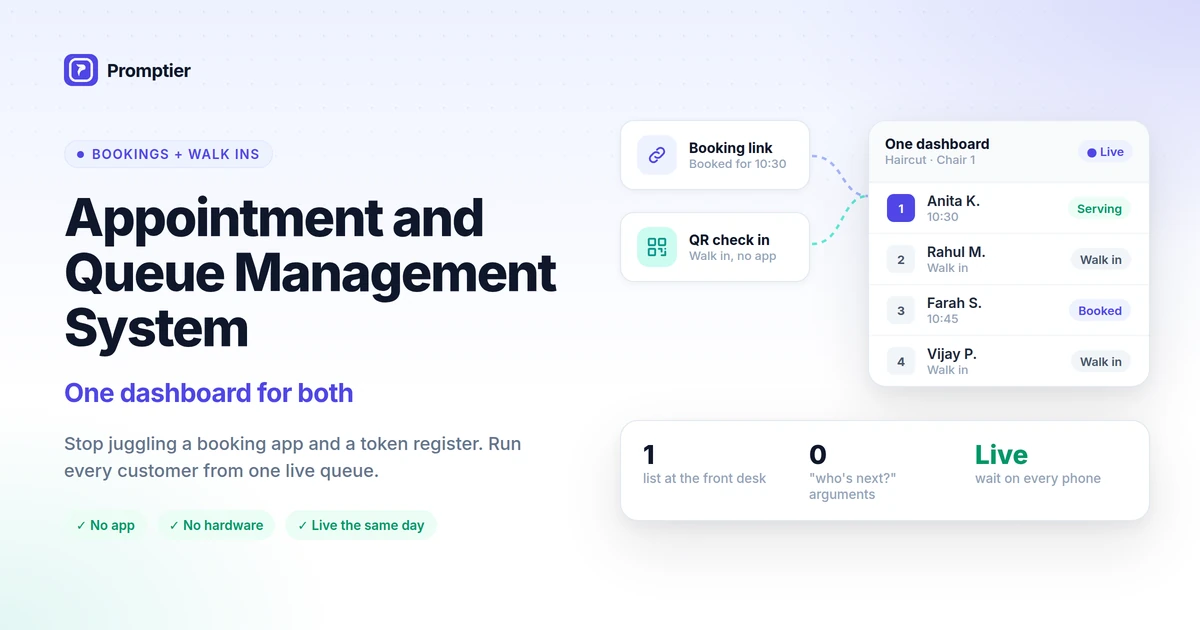
    An appointment and queue management system is one tool that handles both booked appointments and walk in customers. Instead of a booking calendar and a separate token queue, everyone who is expected or waiting appears in one live list. Staff call the next person from one dashboard, customers see one position and one estimated wait on their phone, and every visit is timestamped in one place.

    Key Takeaways

    • Running bookings and walk ins in separate systems forces the front desk to merge two lists by hand all day, which causes disputes, wrong wait estimates and idle time.
    • An appointment and queue management system puts both in one live queue, with each person clearly marked as booked or walk in.
    • When a booking runs late or doesn’t show, the next walk in is already in the list, so no time is lost.
    • Customers see one honest wait time, because the estimate counts everyone in the queue.
    • All your visit data sits in one place, so you can finally see real waits and peak hours.

    What Is an Appointment and Queue Management System?

    An appointment and queue management system combines two tools most businesses run separately:

    1. An appointment booking system, where customers book a time ahead, usually from a link.
    2. A walk in queue, where customers who turn up without a booking take a place in line, usually by scanning a QR code or taking a token.

    In a combined system, both feed one live queue for each service or staff member. The front desk sees one ordered list, marked “Booked” or “Walk in”. Customers follow their own place in it on their phone.

    Key terms used in this guide:

    • Walk in: a customer who arrives without a booking.
    • No show: a booked customer who doesn’t turn up.
    • Unified queue: one list that holds both booked customers and walk ins.
    • Estimated wait: an approximate time until a customer is served, based on everyone ahead of them.

    Why “two systems” is the normal setup, and why it breaks

    Most businesses add tools one at a time. First a register for walk ins. Then a booking app when customers start asking to book. Then WhatsApp because that’s how customers actually get in touch. Each tool solves one problem. Together, they create a new one: nobody has a single view of who is next.
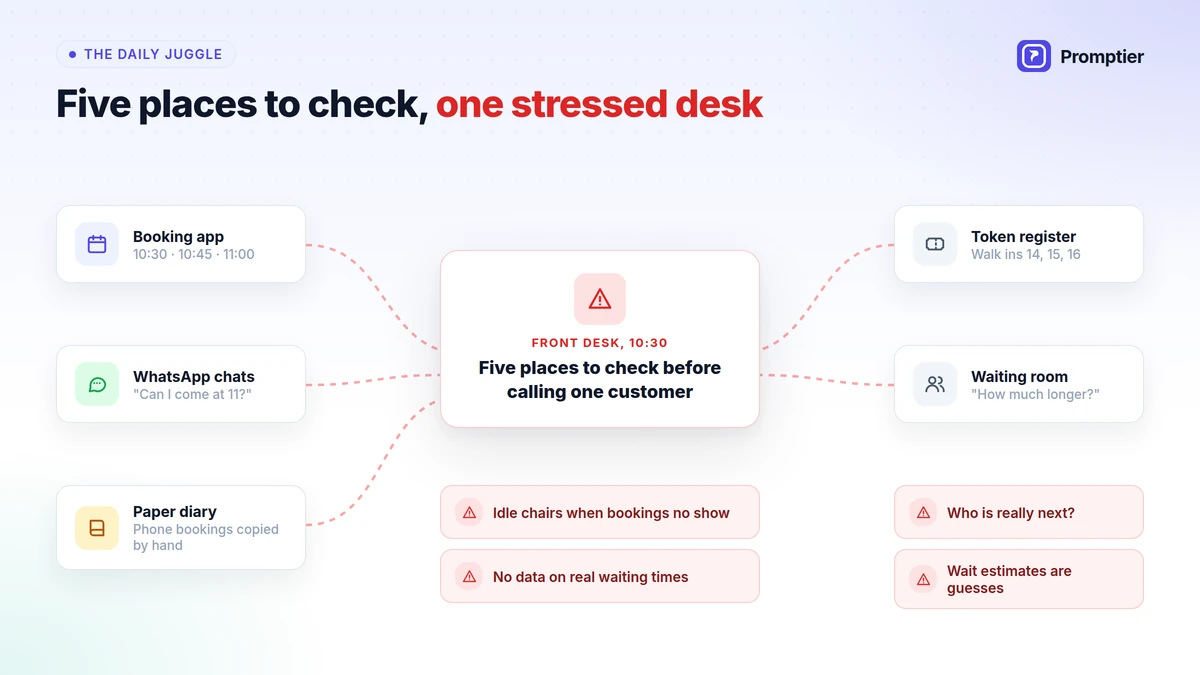
    Front desk chaos from juggling a booking app, WhatsApp, a diary and a token register, with customers disputing who is next

    No shows make this worse. A systematic review of appointment research found that the average no show rate is around 23%. The figure comes from healthcare, but any business that takes bookings knows the pattern. With two systems, every no show is a gap your staff have to spot and fill by hand, while walk ins wait in a different list.

    What One Dashboard Changes

    Moving bookings and walk ins into one dashboard doesn’t make your staff work faster. It removes the work of merging two lists, and the mistakes that come with it.

    1. One list, one order

    The front desk sees one ordered list for each service or staff member. Booked customers and walk ins are both in it, each clearly marked. Nobody has to compare a diary with a register to decide who is next.

    2. No more “I was here first”

    When every customer can see their own place in the same queue, most arguments at the desk disappear. The booked customer knows they have a slot. The walk in can see how many people are ahead of them and how long it will take.

    3. Wait times that count everyone

    In a two system setup, a walk in’s wait estimate ignores the bookings coming up. In one system, the estimate counts everyone in the queue, booked or not. Customers get a number they can trust.

    4. Gaps get filled on their own

    When a booked customer runs late or doesn’t turn up, the next walk in is already in the same list. Staff call the next person and keep working. No chair or counter sits idle while someone searches a second system.

    5. All your data in one place

    Every booking and every walk in is recorded with timestamps in one system. You can finally see how long customers really wait, when your peak hours are, and how many bookings don’t show.

    How It Works, Step by Step

    A typical appointment and queue management system works like this:
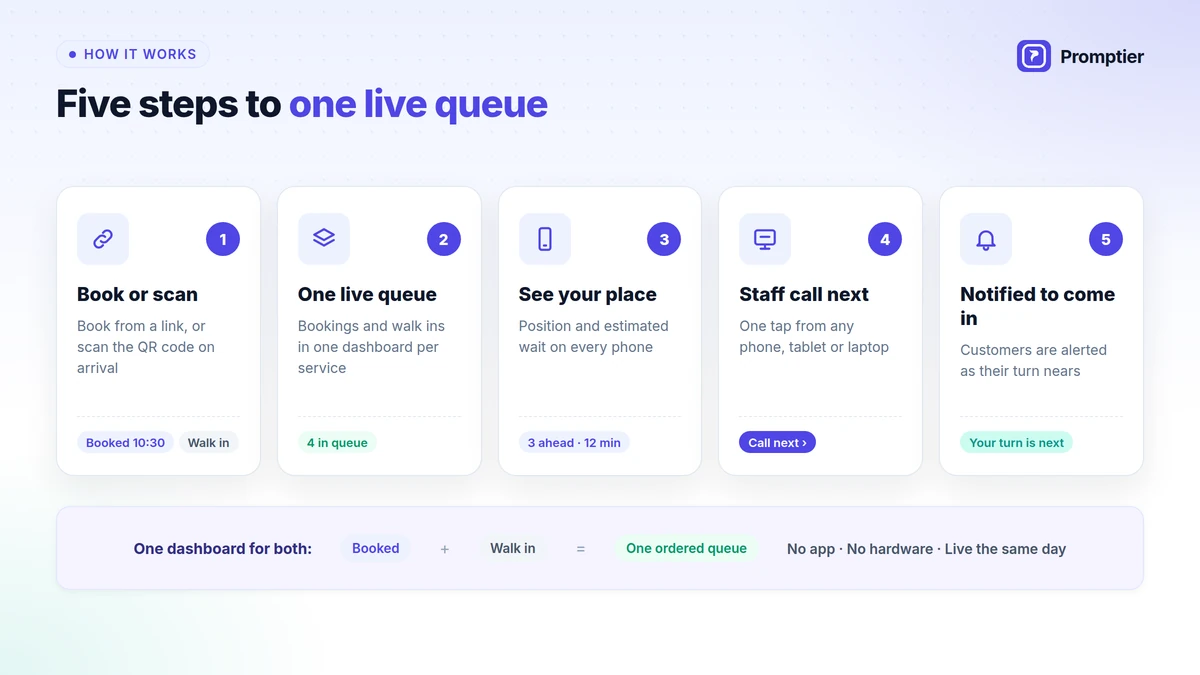
    How an appointment and queue management system works in 5 steps: book or scan, one live queue, see your place, staff call next, notified to come in
    1. Book or scan. Customers book ahead from a link you share on WhatsApp, Google or your website, or scan a QR code at the entrance when they walk in.
    2. One live queue. Booked customers and walk ins appear together in one dashboard for each service.
    3. Everyone sees their place. Each customer sees their position and estimated wait on their own phone, with no app to install.
    4. Staff call next. Your team calls the next person from one list, on any phone, tablet or laptop.
    5. Notified to come in. Customers are notified on their phone as their turn nears, so they can wait nearby instead of crowding the lobby.

    This is exactly how Promptier’s appointment and queue management system works: bookings and walk ins in one dashboard, QR check in with no app, and live position on every customer’s phone.

    The Same Morning With One System

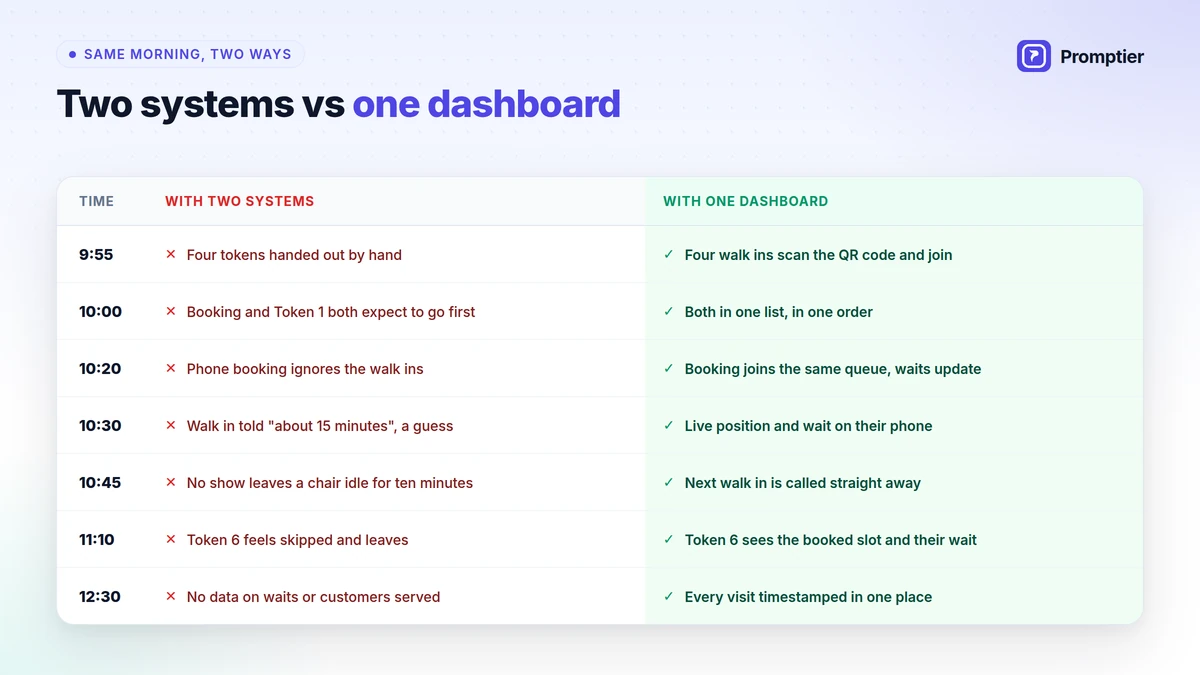
    Here’s the morning from the start of this guide again, with bookings and walk ins in one dashboard:

    TimeWith two systemsWith one dashboard
    9:55Four tokens handed out by handFour walk ins scan the QR code and join the queue
    10:00Booked customer and Token 1 both expect to go firstBoth are in one list, in one order, visible to both
    10:20Phone booking taken without counting walk insThe booking joins the same queue, and everyone’s wait updates
    10:30Walk in told “about 15 minutes”, a guessWalk in sees their live position and estimated wait on their phone
    10:45No show leaves a staff member idle for ten minutesNext walk in is already in the list and gets called straight away
    11:10Token 6 feels skipped and leavesToken 6 can see the booked slot ahead and their own wait
    12:30No data on waits or customers servedEvery visit timestamped in one place
    The same morning with two systems vs one appointment and queue management system: disputes, guesses and idle time vs one order and live waits

    Two Separate Systems vs One Dashboard

    Booking tool plus token queueAppointment and queue management system
    Who’s nextStaff compare two lists by handOne ordered queue
    Wait estimateIgnores the other listCounts bookings and walk ins
    No showsCounter or chair sits idleNext walk in already waiting
    What customers seeA slot time or a token numberLive position on their phone
    DisputesFrequent, since nobody sees the full queueRare, since everyone sees the same order
    HardwareOften a token dispenser, paper and servicingNone, runs on existing devices
    DataSplit across two tools, or noneEvery entry timestamped in one place
    Staff trainingTwo tools to learnOne dashboard

    Signs You Need One Dashboard

    If three or more of these are true, two systems are costing you time every day:

    • Your front desk checks more than one list to decide who is next.
    • Booked and walk in customers argue about who came first.
    • Walk ins are given wait estimates that turn out to be wrong.
    • Staff sit idle when a booking doesn’t show, even though walk ins are waiting.
    • Bookings come in through WhatsApp, calls and an app, and someone copies them into a diary.
    • You can’t say how long customers waited last week, or when your busiest hour is.
    • Your receptionist answers “how much longer?” many times a day.

    Who Needs an Appointment and Queue Management System?

    Any business where some customers book and others simply turn up:

    BusinessBooked customersWalk insWhat one dashboard fixes
    Clinics and OPDsFollow ups and consultationsNew and urgent patientsBooked and walk in patients in one order per doctor
    Salons, spas and barbershopsRegulars who book a slotWalk ins who fill the gapsOne queue per stylist, gaps filled when bookings are late
    Service centresScheduled pickups and repairsWalk in enquiriesOne counter queue instead of two
    Diagnostic labsHome collection and booked testsWalk in sample collectionClear order at the collection counter
    Offices and service desksPre booked visitsWalk in enquiriesOne list for every visitor

    For clinics, see our detailed guide to patient queue management software.

    How to Switch in a Day

    Moving from two systems to one dashboard doesn’t need new hardware or a long rollout:

    1. Create your services, one queue for each service, counter or staff member.
    2. Share your booking link on WhatsApp, your Google Business Profile and your website.
    3. Print your QR code for the entrance and reception, so walk ins can join from their phone.
    4. Open the dashboard on the phone or laptop your front desk already uses.
    5. Put the queue on a TV in the waiting area, if you have one.
    6. Run both for a day, then retire the old register or token machine.

    Keep your existing booking habits. Customers who used to message you on WhatsApp can get your booking link in the same chat.

    How Promptier Brings Bookings and Walk Ins Together

    Promptier was built for exactly this problem. It puts every booked customer and every walk in into one live queue.

    • Appointments and walk ins together in one dashboard, so your front desk works from a single ordered view.
    • Built in appointment booking from a link you share on WhatsApp, Google or your website.
    • Walk in QR check in from any phone browser, with nothing to install.
    • Live position and phone notifications, so everyone knows their place and can wait anywhere.
    • Separate queues per service, shown on any TV, with timestamped wait data for planning.
    • No hardware, and most businesses are live the same day.
    • Pricing. Free to start. Pro is ₹499 per month per location with 1,000 bookings a month and unlimited queue users. Multi location businesses can ask for Enterprise pricing.

    Still using a token machine for walk ins? Promptier replaces that too. Read how a digital token management system works.

    See how Promptier puts appointments and walk ins in one dashboard

    Frequently Asked Questions

    What is an appointment and queue management system?

    An appointment and queue management system is one tool that handles both booked appointments and walk in customers. Everyone who is expected or waiting appears in one live list, so staff call the next person from a single view and customers see one accurate wait time.

    How do appointments and walk ins appear in one queue?

    Booked customers and walk ins are shown together in one dashboard for each service, each marked as booked or walk in. The front desk sees who is booked, who has walked in and who is next, and calls the next person from that one list.

    What happens when a booked customer is late or doesn’t show?

    Because walk ins are already in the same queue, staff can see the gap straight away and call the next person waiting. The counter or chair doesn’t sit idle while someone checks a separate list.

    Do customers need an app to book or join the queue?

    No. Customers book from a link or join by scanning a QR code, and everything runs in their phone’s browser. There’s nothing to install and no account to create.

    Can I keep taking bookings on WhatsApp?

    Yes. Share your booking link in WhatsApp chats, on your Google Business Profile and on your website. Customers book from the link, and their booking appears in the same queue as your walk ins.

    What kinds of businesses need one dashboard for bookings and walk ins?

    Clinics, hospital OPDs, salons, spas, barbershops, diagnostic labs, service centres and offices. Any business that takes bookings and also serves walk ins benefits from one queue.

    How much does it cost?

    Promptier is free to start. The Pro plan is ₹499 per month per location and includes 1,000 bookings a month with unlimited queue users. Multi location businesses can ask for custom Enterprise pricing.

    Conclusion

    The chaos at a busy front desk rarely comes from too many customers. It comes from two lists that don’t talk to each other, and a receptionist stuck merging them by hand.

    One dashboard fixes the structure, not the staff. One order, one honest wait time, and one place for your data. Your customers stop arguing about who came first, your staff stop losing time to no shows, and you finally see how your day really runs.

    Ready to run one queue instead of two? See how Promptier’s appointment and queue management system works and book a free demo. No hardware, no customer app, support in IST hours.

    Related reading
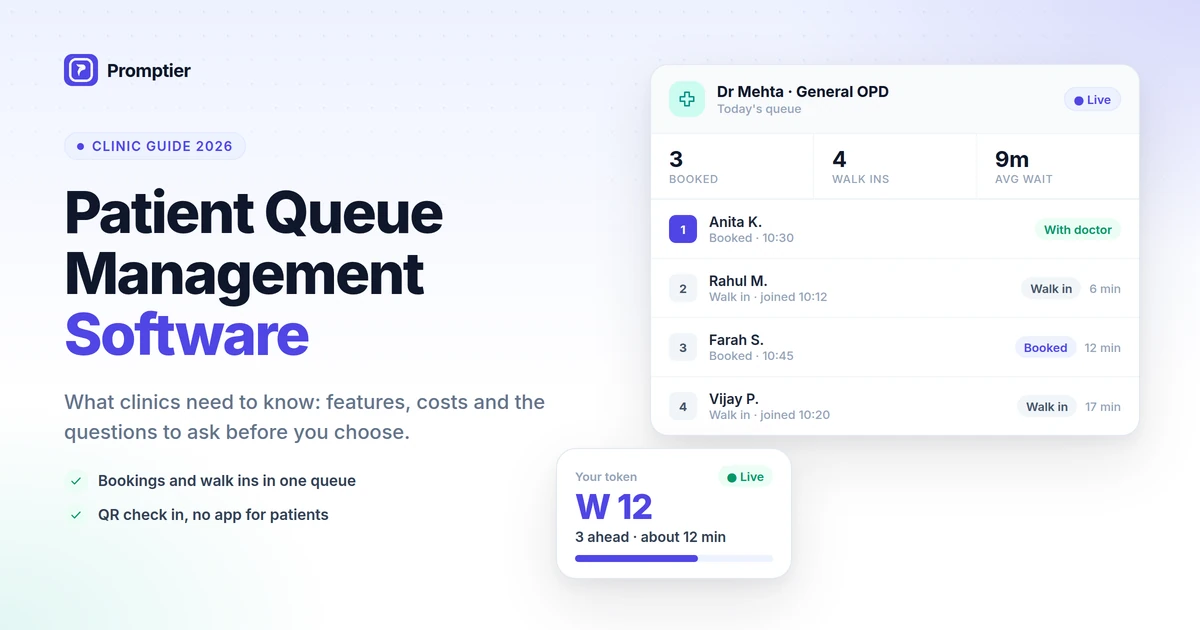
  • Patient Queue Management Software: What Clinics Need to Know

    Patient Queue Management Software: What Clinics Need to Know

    Patient queue management software decides who sees the doctor next, tells every waiting patient how long they have left, and gives your front desk one list to work from instead of three. For a busy clinic, it’s the difference between a calm waiting room and a reception desk answering “how much longer?” all morning.

    If you run a clinic, you know the pattern. Booked patients expect to go in on time. Walk in patients have been waiting since the doors opened. The doctor is running 20 minutes late, a booked patient hasn’t turned up, and your receptionist is trying to keep a diary, a token register and a WhatsApp chat in step.

    This guide explains what patient queue management software does, which features actually matter for a clinic, what it costs, and the questions to ask before you choose one.

    Patient queue management software is a tool that manages the order in which patients are seen and shows each patient their live position and estimated wait. The best options for clinics put booked appointments and walk in patients in one queue, let patients check in by scanning a QR code with no app, notify them on their phone as their turn nears, and record every visit with timestamps. Browser based options run on the phones, laptops and TVs a clinic already has.

    Key Takeaways

    • The biggest source of front desk stress in most clinics is running appointments and walk ins in two separate systems.
    • Good patient queue management software puts both in one live queue, so staff call the next patient from a single list.
    • Patients should be able to check in by QR code and follow their place on their phone, with no app and no account.
    • Queue software sits next to your clinic management system or EMR. It manages the wait, not the medical record.
    • Browser based tools cost far less than token machines and can be live the same day.

    What Is Patient Queue Management Software?

    Patient queue management software is a digital system that manages how patients check in, wait and get called for consultation. It replaces paper tokens, registers and shouted names with a live queue that staff control from a dashboard and patients follow on their phones or a waiting room screen.

    Most tools do four jobs:

    1. Check in: the patient joins the queue, usually by scanning a QR code at reception or booking ahead from a link.
    2. Ordering: the software keeps one ordered list per doctor or department.
    3. Visibility: each patient sees their live position and estimated wait, and a TV shows who is being seen.
    4. Records: every entry is timestamped, so you can see real waiting times and peak hours.

    Key terms used in this guide:

    • Walk in patient: a patient who arrives without a booking.
    • Booked patient: a patient with an appointment time.
    • OPD: the outpatient department, where patients are seen without being admitted.
    • Live position: the patient’s current place in the queue, such as “3 ahead of you”, updated as patients are called.

    How it differs from clinic management software

    Clinic management software and EMRs store patient records, prescriptions and bills. Patient queue management software manages the waiting room: who is here, who is next and how long each patient will wait. Many clinics run both side by side. If your clinic management tool already has a basic token feature, the question is whether it shows patients their live position, handles walk ins and bookings together, and works without an app.

    Digital check in is already normal in India

    Indian patients are already used to scanning a QR code to register for an OPD visit. The government’s ABHA based Scan and Register service (earlier called Scan and Share) lets patients register by scanning a QR code at the hospital counter. It has crossed 25 crore OPD registrations across more than 30,800 health facilities, and the National Health Authority has said it significantly reduces waiting time at registration. Patients who can register by QR code at a government hospital will expect the same at a private clinic.

    Why Clinics Struggle With Patient Queues

    A clinic queue is harder to run than most because it mixes two kinds of patient with very different expectations.

    The appointment and walk in collision

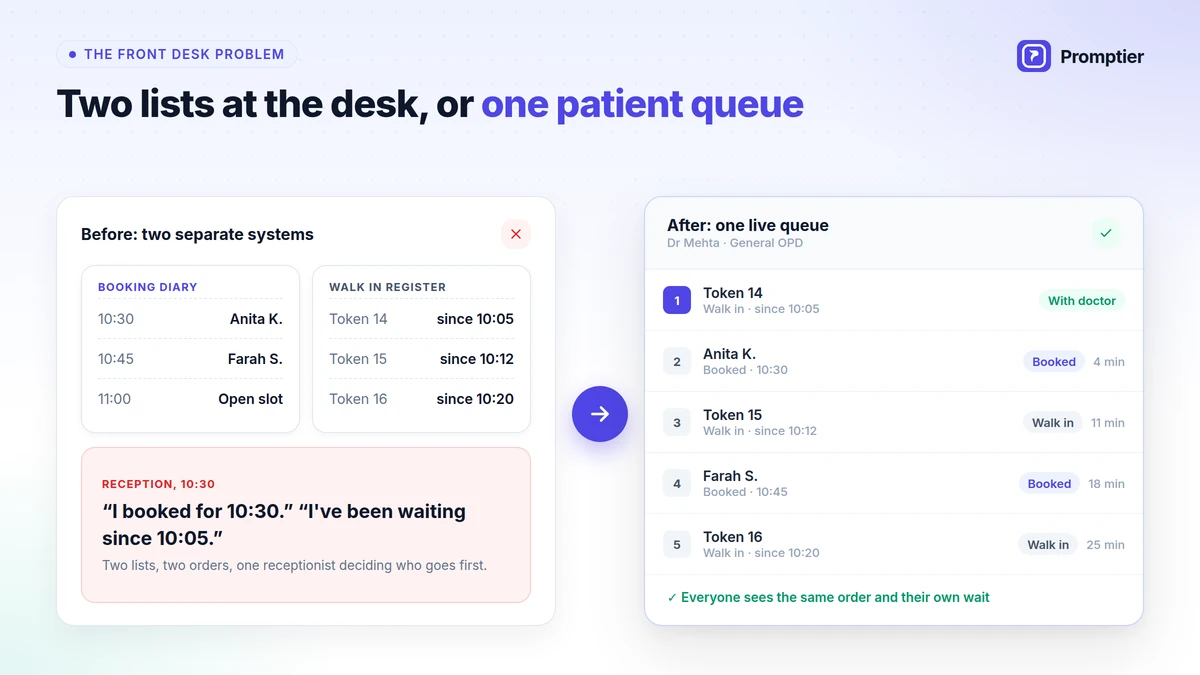
    Most clinics take bookings in one place, such as a diary, a booking app or WhatsApp, and manage walk ins in another, such as a token machine or a register. Each works on its own. The trouble starts at the front desk, where one person has to merge two lists by hand, every few minutes, while patients watch.

    That’s where the arguments come from. “I booked for 10:30.” “I’ve been waiting since 10:05.” Both patients are right, and neither can see the other’s list.

    Other problems a clinic queue creates

    • Wait estimates are guesses. A walk in is told “about 15 minutes”, but the three bookings coming up aren’t counted.
    • No shows leave gaps. A booked patient doesn’t come, and the doctor waits while the receptionist checks the walk in register.
    • Crowded waiting rooms. Patients stay in the room for fear of missing their turn, which matters more in a clinic, where some of them are unwell.
    • Reception overload. Every “how much longer?” takes the receptionist away from new arrivals and phone calls.
    • No data. Without timestamps, you can’t tell how long patients really wait or when to add a second doctor.

    Even in large hospitals, waiting adds up. A 2024 time and motion study of an outpatient department at a tertiary hospital in Tamil Nadu measured an average total waiting time of about 32 minutes per visit. Waits like that feel far longer when patients can’t see how much is left.

    Clinic front desk collision: a booking diary and a walk in register lead to disputes, while patient queue management software puts both in one queue

    Features a Clinic Actually Needs

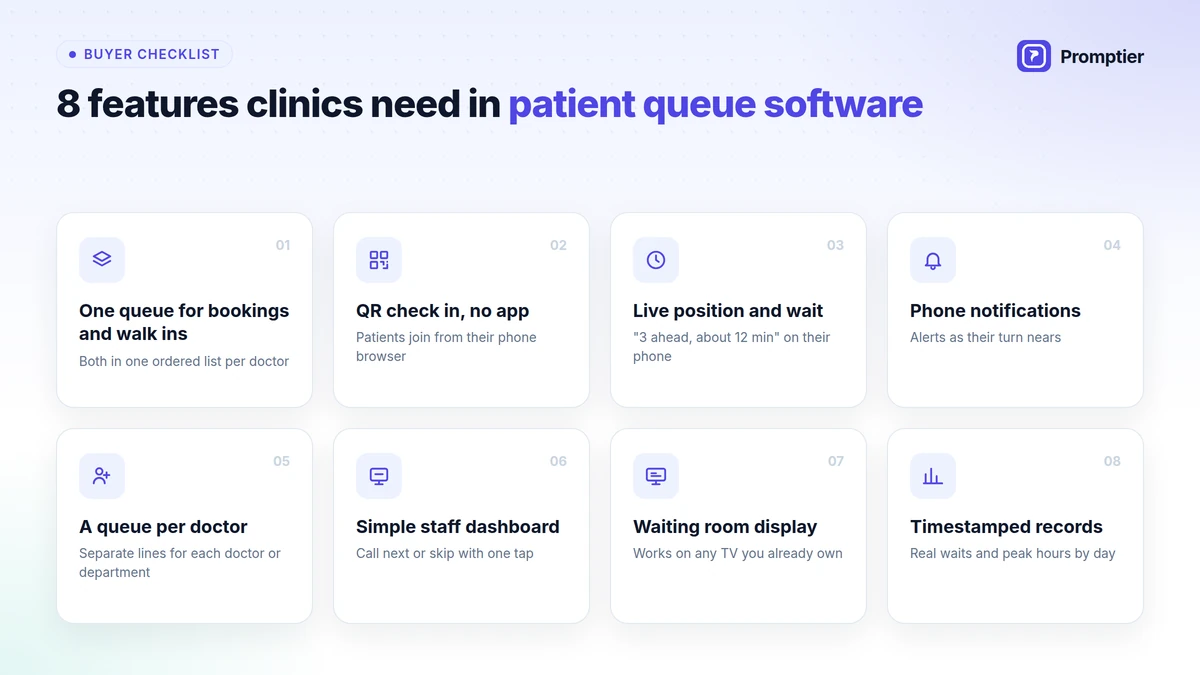
    Plenty of tools call themselves patient queue management software. These are the features that make a difference in a clinic, in rough order of importance.

    Eight features clinics need in patient queue management software: one queue for bookings and walk ins, QR check in, live position, notifications and more

    1. Appointments and walk ins in one queue

    This matters more than anything else. Booked and walk in patients should appear in one ordered list per doctor, marked “Booked” or “Walk in”, so the front desk never has to merge two lists by hand. If a tool handles only walk ins or only bookings, you’ll still be juggling.

    2. QR check in with no app

    Patients should join by scanning a QR code at reception and follow their place in their phone’s browser. Asking a patient with a fever to download an app and create an account won’t work.

    3. Live position and estimated wait

    Each patient should see “3 ahead of you, about 12 minutes” on their phone, updated as the doctor calls patients. This one feature removes most “how much longer?” questions at the desk.

    4. Phone notifications

    Patients should be notified on their phone as their turn nears. That lets them wait outside, in their car or at the pharmacy, which keeps the waiting room less crowded.

    5. A queue for each doctor or department

    A clinic with two doctors, or a doctor plus a lab or physiotherapy, needs a separate queue for each. Patients should see the queue for the doctor they are waiting for, not one mixed line.

    6. A simple staff dashboard

    Reception and doctors should be able to call next or skip with one tap, from any phone, tablet or laptop. If staff need training to use it, they won’t.

    7. A waiting room display

    A TV or monitor in the waiting area should show the token being seen. It helps patients who look up rather than at their phones, and it should work on a screen you already own.

    8. Timestamped records

    Every check in, call and consultation should be recorded with a time. That gives you real waiting times, peak hours by day, and a record to check when a patient says they were skipped.

    How Appointments and Walk Ins Share One Queue

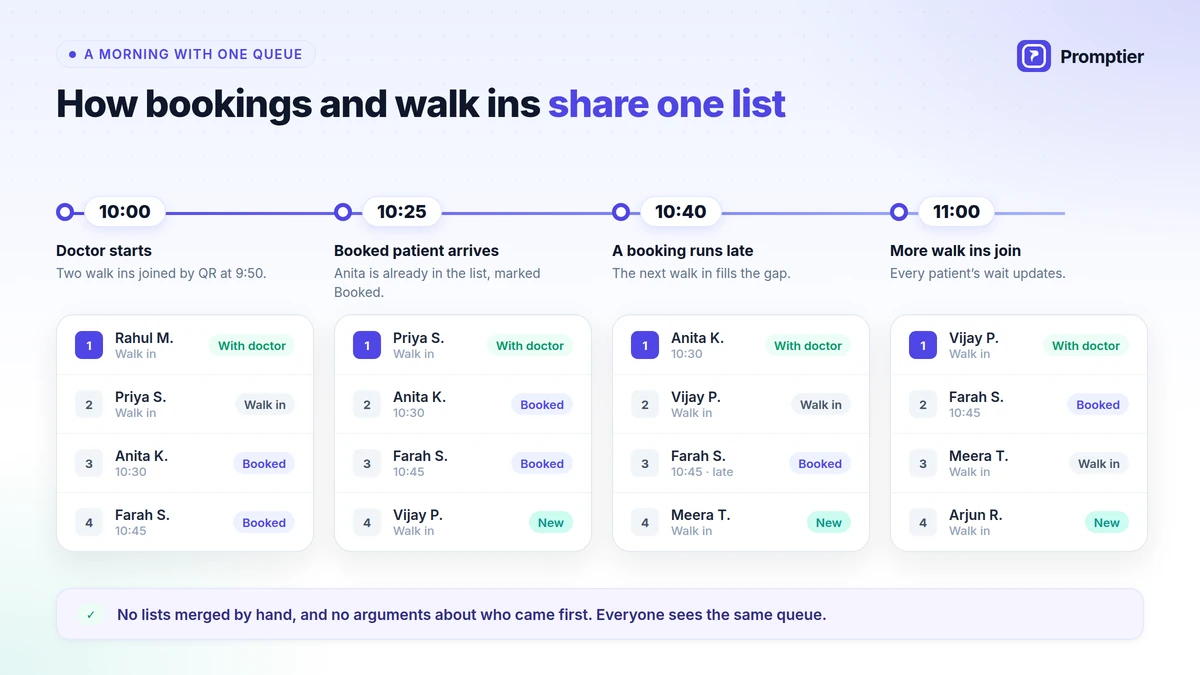
    Here’s how a typical morning looks for one doctor when bookings and walk ins are in the same queue:

    TimeWhat happensWhat the front desk sees
    10:00Doctor starts. Two walk ins scanned the QR code at 9:50.One list: Walk in, Walk in, Booked 10:30, Booked 10:45
    10:25Booked patient for 10:30 arrives at reception.They are already in the list, marked Booked. Walk ins can see how many are ahead of them.
    10:40The 10:45 booked patient messages that they’ll be late.The next walk in is already in the list, so the doctor keeps seeing patients.
    11:00Three more walk ins join from the waiting room QR code.They join the same list, and every patient’s estimated wait updates.
    11:30Morning ends.Every entry has join, call and finish times for the day’s report.

    Nobody merges lists by hand, and nobody argues about who came first, because everyone can see the same queue. This is the approach behind Promptier’s appointment and queue management system, which shows booked patients and walk ins together in one dashboard for each service.

    One clinic queue through a morning, with booked and walk in patients in the same list and the next walk in seen when a booking runs late

    Patient Queue Management Options Compared

    Paper registerToken machineBooking app plus token queuePatient queue management software
    Handles bookings and walk ins togetherNoNoNo, two separate listsYes, one live queue
    Patient sees live positionNoNo, only the number calledNoYes, on their phone
    Estimated waitNoNoCounts only one listCounts everyone in the queue
    Patient can wait outsideNoRiskyRiskyYes, notified on their phone
    Data on waiting timesNoneLimitedSplit across two toolsEvery entry timestamped
    HardwareNoneDispenser, paper, servicingDispenser or registerNone, runs on existing devices
    SetupInstantVendor installationTwo tools to set upUsually the same day

    What Patient Queue Management Software Costs

    Costs vary widely, so compare the whole cost, not just the monthly fee.

    • Token machines cost roughly ₹9,000 to ₹40,000 or more for the hardware, plus paper rolls and servicing. See the full breakdown in our token machine vs digital queue cost comparison.
    • Hospital and clinic management suites often include a basic queue module, but the queue is one small part of a larger, more expensive system.
    • Browser based queue software usually charges a monthly subscription, with no hardware. Promptier, for example, is free to start, and its Pro plan is ₹499 per month per location, including 1,000 bookings a month.

    Also count the hidden costs: receptionist time spent merging lists, doctor time lost to no show gaps, and patients who leave because the wait looked too long.

    10 Questions to Ask Before You Choose

    Use these questions in any demo. A vendor that can’t answer them clearly isn’t the right fit for a clinic.

    • Can booked and walk in patients sit in one queue, clearly marked?
    • Can patients check in by QR code without installing an app or creating an account?
    • Do patients see their live position and estimated wait, and does the estimate count both bookings and walk ins?
    • Are patients notified on their phone as their turn nears?
    • Can I run a separate queue for each doctor or department?
    • Does it run on the phones, laptops and TV we already have, or do we need to buy hardware?
    • Is every entry timestamped, and can I see or export waiting time data?
    • What patient data is collected, where is it stored, and who can see it? Clinics handle personal data, and India’s Digital Personal Data Protection Act, 2023 applies, so ask for a clear answer.
    • How long does setup take, and who helps us if something goes wrong? Is support available in IST hours?
    • What does it cost in total, including bookings, extra staff logins and additional locations?

    How to Set Up Patient Queue Management in Your Clinic

    With a browser based system, most clinics can be live in a day:

    1. Create a queue for each doctor or service, such as “Dr Mehta, General” or “Physiotherapy”.
    2. Share your booking link on WhatsApp, your Google Business Profile and your website, so patients can book ahead.
    3. Print the QR code and place it at the entrance and reception for walk ins, with one line: “Scan to join the queue. No app needed.”
    4. Open the display page on the waiting room TV.
    5. Log in reception and doctors on the phones or laptops they already use.
    6. Tell patients they can wait outside. A small sign helps: “Follow your place on your phone. We’ll notify you.”
    7. Check the data after two weeks. Look at average waits, peak hours and no shows, then adjust booking slots and staffing.

    How Promptier Works for Clinics

    Promptier is a clinic queue system built around the collision that clinics deal with every day: bookings and walk ins arriving at the same desk.

    • Appointments and walk ins in one queue. Booked patients and walk ins appear together in one dashboard for each service, so reception calls the next patient from one list.
    • Built in booking. Patients book from a link you share on WhatsApp, Google or your website.
    • QR check in, no app. Walk ins scan a QR code and join from any phone browser.
    • Live position and estimated wait, with phone notifications as their turn nears, so patients can wait anywhere.
    • A queue per service or doctor, shown on any TV you already own.
    • Every entry timestamped, so you can see real waiting times and peak hours.
    • No hardware. Most clinics are live the same day.
    • Pricing. Free to start. Pro is ₹499 per month per location with 1,000 bookings a month. Multi location clinics and hospital groups can ask for Enterprise pricing.

    Running a larger OPD? See the hospital queue management system and our complete guide to queue management in hospitals.

    See how Promptier puts appointments and walk ins in one queue

    Frequently Asked Questions

    What is patient queue management software?

    Patient queue management software is a digital system that manages how patients check in, wait and get called for consultation. It keeps an ordered queue for each doctor, shows each patient their live position and estimated wait, and records every visit with timestamps.

    Does a patient queue system replace my clinic management system or EMR?

    No. Clinic management software and EMRs hold patient records, prescriptions and billing. A queue system manages the waiting room: who is here, who is next and how long each patient will wait. Most clinics use both.

    Can one system handle both appointments and walk in patients?

    Yes, and for most clinics it should. The best tools put booked patients and walk ins in one live queue for each doctor, so the front desk works from one list instead of merging a booking diary and a token register by hand.

    Do patients need to download an app?

    Not with a browser based system. Patients scan a QR code or open a booking link, and everything runs in their phone’s browser. There’s nothing to install and no account to create.

    How does it reduce waiting room crowding?

    Patients can see their live position and estimated wait on their phone and are notified as their turn nears, so they don’t need to stay in the waiting room. Many choose to wait outside or run a short errand instead.

    How much does patient queue management software cost in India?

    It depends on the type. Token machines cost roughly ₹9,000 to ₹40,000 or more in hardware, plus upkeep. Browser based software usually has a monthly fee and no hardware. Promptier is free to start, and its Pro plan is ₹499 per month per location.

    How long does it take to set up in a clinic?

    With a browser based system, most clinics are live the same day. You create a queue for each doctor, share your booking link, print a QR code and open the dashboard on devices you already have.

    Conclusion

    A clinic’s waiting room problem is rarely about the doctor’s speed. It comes from running bookings and walk ins in separate places, and from patients who can’t see how long they’ll wait.

    The right patient queue management software fixes both. It puts every patient in one queue, shows each one their live position, lets them wait outside, and gives you the data to plan your day. Choose a tool that does that without an app for patients or hardware for you, and your front desk will feel the difference in the first week.

    Ready to end the collision at your front desk? See how Promptier’s appointment and queue management system works and book a free demo. No hardware, no patient app, support in IST hours.

    Related reading
  • Real Time Queue Management: What It Is and Why It Reduces Walkouts

    Real Time Queue Management: What It Is and Why It Reduces Walkouts

    Real time queue management shows every waiting customer where they stand in the line and how long they have left, updated live on their own phone. That one change matters more than it sounds. Most customers don’t walk out because the wait is long. They walk out because they can’t tell how long it is.

    You have seen it happen. A customer walks into your clinic, salon or service centre, sees a full waiting area, takes a paper token, waits ten minutes with no idea how far the counter has got, and quietly leaves. You never find out why, and you never see them again.

    This guide explains what real time queue management is, why uncertainty drives walkouts, and how showing live position keeps customers in the queue.

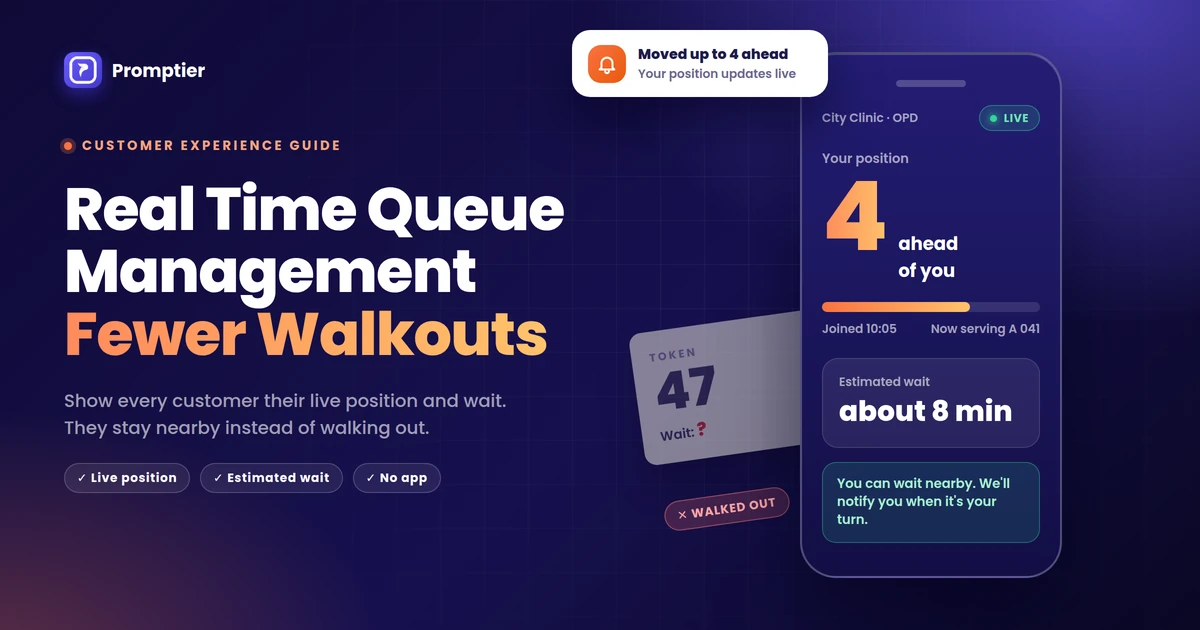
    Real time queue management is a way of running a queue where each customer’s position and estimated wait update live as the line moves, usually on their phone after scanning a QR code. It reduces walkouts because it removes uncertainty. Customers who can see their place and wait time are less anxious, can wait nearby instead of in the lobby, and don’t fear losing their turn.

    Key Takeaways

    • Uncertainty makes waits feel longer than they are. Research on the psychology of waiting has made this point since the 1980s.
    • There are two kinds of walkout: customers who see the crowd and never join, and customers who join and give up halfway.
    • A live position and estimated wait replace a guess with a number, which lowers anxiety and makes people more willing to stay.
    • Because the queue lives on the customer’s phone, they can wait in their car or step out on an errand without losing their place.
    • Every queue entry is timestamped, so you can count walkouts instead of guessing at them.

    What Is Real Time Queue Management?

    Real time queue management is a queue system that tracks every customer from the moment they join to the moment they are served, and shows the current state of the line to customers and staff as it changes. When staff call the next customer, everyone else’s position moves up immediately, on their phone and on the lobby screen.

    A traditional queue stops at issuing a number. A real time queue keeps talking to the customer until their turn comes.

    Key terms used in this guide:

    • Live position: the customer’s current place in the line, such as “4 ahead of you”, which updates each time someone is called.
    • Estimated wait: an approximate time until the customer is served, based on how fast the line is moving.
    • Virtual queue: a queue that customers join from their phone, so they don’t need to stand in a physical line.
    • Walkout: a customer who leaves without being served. Operations researchers split this into balking (seeing the queue and never joining) and reneging (joining and then leaving).

    Why Customers Walk Out: It’s the Uncertainty, Not Only the Wait

    Long waits cause walkouts, but they aren’t the whole story. The same 20 minute wait can feel fine or unbearable depending on what the customer knows.

    Service researcher David Maister described this in his well known essay The Psychology of Waiting Lines. Three of his eight principles explain most walkouts:

    • “Uncertain waits are longer than known, finite waits.” A customer told “about 15 minutes” settles in. A customer told nothing starts checking the clock.
    • “Unexplained waits are longer than explained waits.” If the line stops moving and nobody knows why, patience drops fast.
    • “Anxiety makes waits seem longer.” The biggest worry in a paper token queue is simple: “If I step out for a minute, will I miss my turn?”

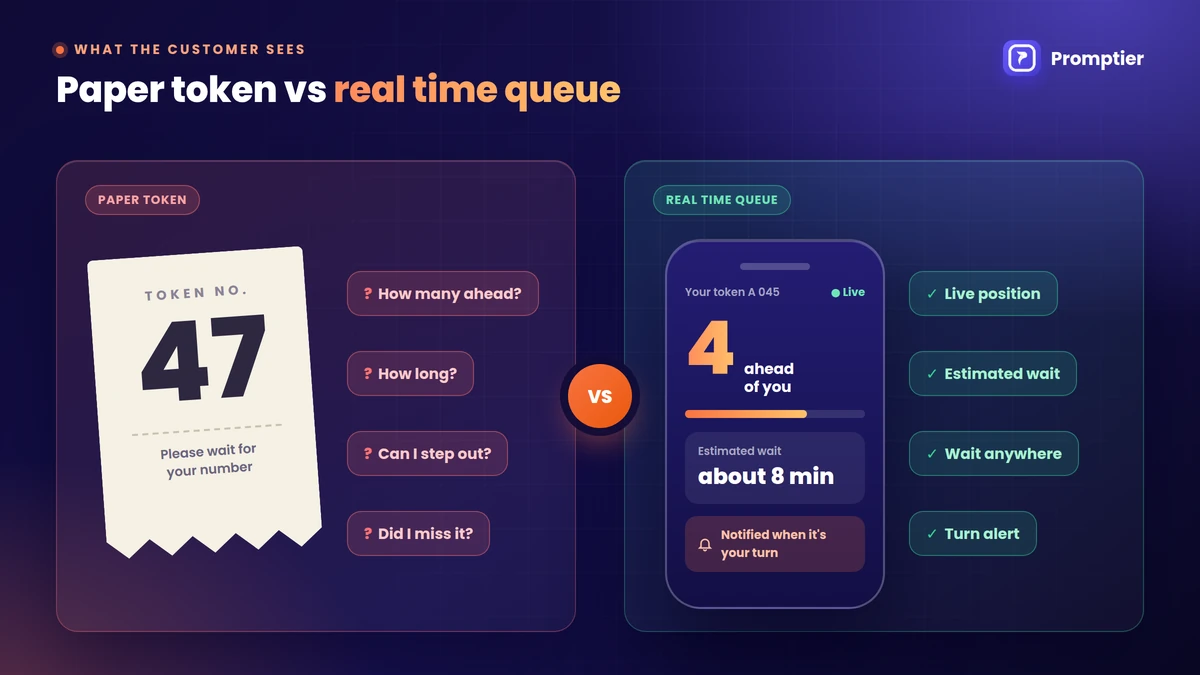
    What a customer can’t see in a paper token queue

    Hand someone a slip that says 47 and they have to answer these questions on their own:

    1. How many people are ahead of me?
    2. How fast is the line moving?
    3. How long will I be here?
    4. Can I step out, or will I lose my turn?
    5. Was someone served out of order?

    With a crowd and a token display that shows only the last number called, the customer guesses. Most people guess high. Some of them leave.

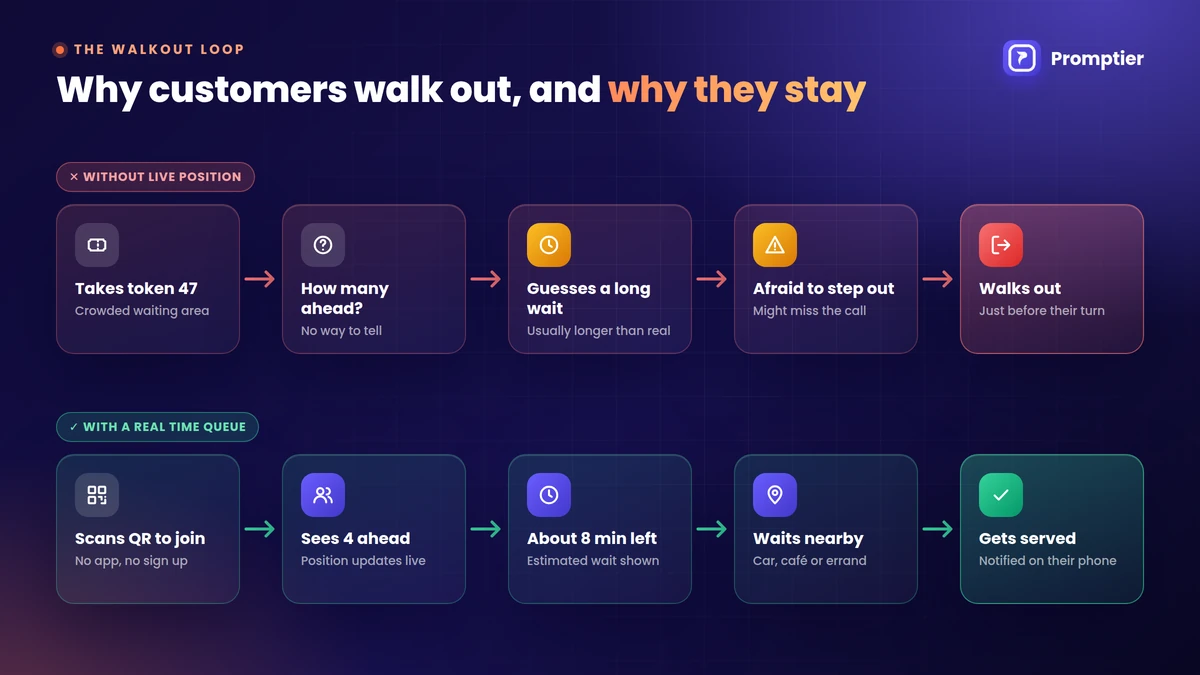
    The walkout loop

    A walkout usually follows the same five steps:

    1. The customer arrives and sees a full waiting area.
    2. They can’t see their position or how fast the line moves.
    3. They guess the wait is long, usually longer than it really is.
    4. Anxiety builds, because they can’t leave without risking their turn.
    5. They leave, often just before they would have been called.

    The cost doesn’t stop with one lost sale. That customer may not come back, may tell others about the wait, and may leave a review about it. And the slot they gave up often goes unused while staff call a number that nobody answers.

    Why customers walk out of queues: uncertainty about position and wait leads to walkouts, while a live position keeps customers in the queue

    How Live Position Keeps Customers in the Queue

    If uncertainty drives walkouts, the fix is to take the uncertainty away. A live queue does that in five ways.

    Research backs this up. A study in Management Science by Qiuping Yu, Gad Allon and Achal Bassamboo looked at how customers react to announced wait times and found that delay announcements change both what customers expect and how costly the wait feels to them. A separate study of ticket queues by Kaan Kuzu, Long Gao and Susan Xu found that customers adapt their patience to the waiting context and keep updating their decision as they learn more. Put simply, people decide whether to stay based on the information you give them. Give them better information and more of them stay.

    1. A known number replaces a guess

    “6 ahead of you, about 12 minutes” is something a customer can plan around. They can reply to a message, call home or just relax. A guess of “who knows, maybe an hour” makes them leave.

    2. Customers can wait anywhere

    This is the biggest change. With a real time queue on their phone, the customer doesn’t need to stay in the lobby to keep their place. They can sit in their car, get a coffee or finish a quick errand nearby, and watch their position move. Most walkouts happen because staying feels like a trap. Take the trap away and the reason to leave goes with it.

    3. Progress is visible

    Watching your position drop from 7 to 6 to 5 feels like movement, even when the line is slow. Maister called this out as well: people want to feel the process has started. A number on a slip that never changes gives the opposite feeling.

    4. The order is visibly fair

    Maister’s research found that unfair waits feel longer than fair ones. In a crowded lobby, one person being served out of turn can make five others leave. In a real time queue, everyone sees their position move in order, and staff calls are recorded, so arguments about who came first mostly disappear.

    5. A notification removes the fear of missing a turn

    The last worry is “what if they call me while I’m away?” When the customer’s phone tells them it’s their turn, that worry goes away. They can relax instead of watching the counter.

    Paper Token vs Real Time Queue: What the Customer Sees

    Question the customer hasPaper token or crowdReal time queue
    How many are ahead of me?Unknown. They count heads or guess.Shown live, such as “4 ahead of you”
    How long will it take?UnknownEstimated wait shown and updated
    Can I step out?Risky. They might miss their number.Yes. Their place is kept on their phone.
    Is the line moving?Only if they watch the displayPosition drops each time someone is called
    Will I know when it’s my turn?Only if they’re in the roomNotified on their phone
    Was it fair?Hard to tell in a crowdOrder is visible and every entry is timestamped
    Paper token vs real time queue: what the customer can see about position, wait time, stepping out and being called

    The table shows why the effect on walkouts can be large even when the actual wait doesn’t change. The service takes the same time. What changes is how the wait feels, and whether the customer has to stay in the room for it.

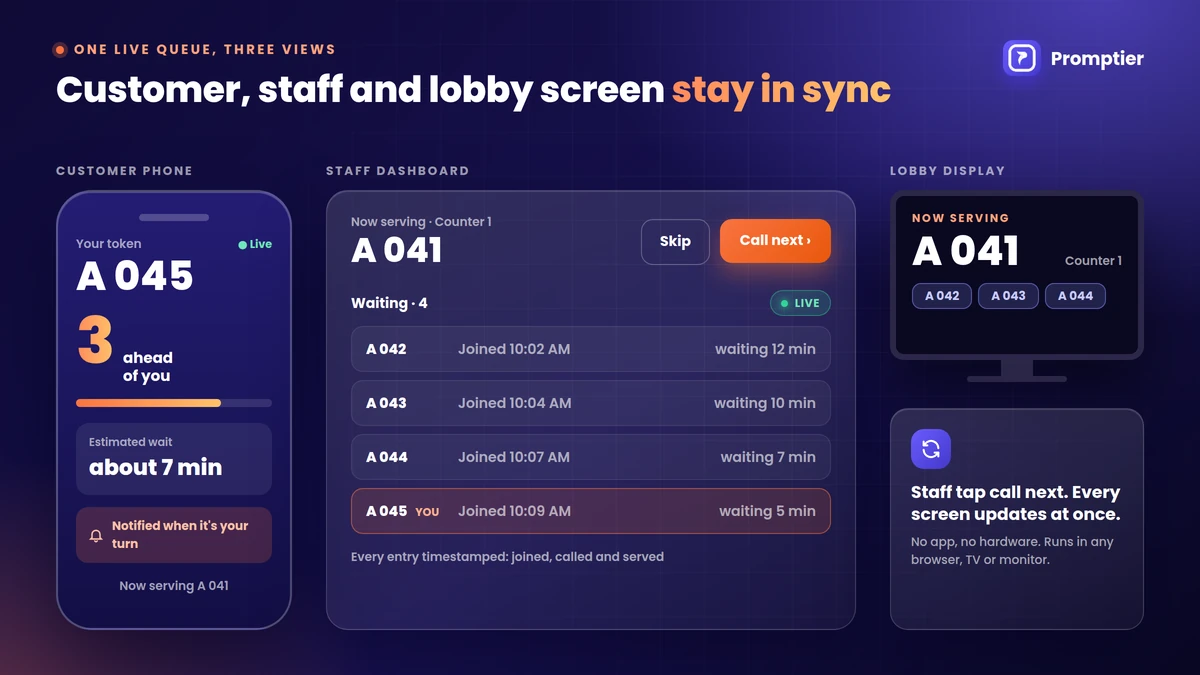
    What Staff See on a Real Time Queue Dashboard

    A live queue isn’t only for customers. The same live data gives staff and owners a clear view of the line:

    • Who is waiting right now, in order, with the time each person joined
    • Call next and skip buttons, so the queue moves with one tap
    • A lobby display on any TV or monitor, showing the number being served
    • A timestamped record of every entry, from joining to being served
    Real time queue management with a customer phone showing live position and a staff dashboard with call next, skip and timestamped entries

    A real time queue management system like Promptier runs all of this in the browser. Customers join by scanning a QR code with no app, staff manage the line from a live dashboard, and the lobby screen works on any smart TV or monitor you already own.

    How to Set Up Real Time Queue Management

    Setting up a real time queue doesn’t need new hardware. A typical setup looks like this:

    1. Create your queue. Name it after your business or the service, such as “OPD” or “Haircut”.
    2. Print the QR code. Put it at the entrance and at the reception desk, with one line of text: “Scan to join the queue. No app needed.”
    3. Open the lobby display. Load the display page on a TV or monitor in the waiting area. This step is optional but helps customers who look up rather than down.
    4. Log staff in. Each staff member opens the dashboard on a phone, tablet or laptop and uses call next when they’re free.
    5. Tell customers they can step out. This is the step most businesses forget. A small sign that says “Watch your place on your phone. You can wait outside.” turns the feature into fewer walkouts.
    6. Review the data weekly. Look at waits, peak hours and customers who left, and adjust staffing.

    How to Measure Walkouts Before and After

    You can’t reduce what you don’t measure, and most businesses have never counted their walkouts. Here’s a simple way to do it.

    Before you switch (one or two weeks):

    • Count paper tokens issued each day.
    • Count customers actually served.
    • The gap between the two is roughly your walkout count.

    After you switch (same number of weeks):

    • Count queue entries each day from your dashboard.
    • Count entries served.
    • Count entries that were skipped or never served.

    Compare the walkout rate, which is walkouts divided by customers who joined, for the two periods. Compare the same weekdays so a busy Monday isn’t matched against a quiet Wednesday.

    To see what walkouts cost, try an example. A clinic sees 60 walk in patients a day. If 5 leave before being seen and the average bill is ₹400, that’s ₹2,000 a day, or about ₹50,000 over 25 working days. Winning back even half of those is worth far more than the cost of a real time queue.

    Where a Live Queue Helps Most

    Walkouts hurt most where customers arrive without a booking and the wait varies:

    • Clinics and hospital OPDs, where patients wait unsure of their turn and often step out for pharmacy or food
    • Salons and barbershops, where a full waiting area makes new customers walk past
    • Bank branches and service centres, where different jobs take very different times
    • Government and utility offices, where queues are long and people fear losing their place
    • Restaurants with a waitlist, where diners want to wait nearby rather than at the door

    How Promptier Does Real Time Queue Management

    Promptier is a browser based queue system built for Indian businesses.

    • QR check in, no app, no sign up. Customers scan and join from any phone browser.
    • Live position and estimated wait. Customers see their place in line and how long is left.
    • Notified on their phone when it’s their turn, so they can wait anywhere.
    • Live staff dashboard with call next and skip.
    • Lobby display on any screen you already own, from a smart TV to a spare monitor.
    • Every entry timestamped, so you can measure waits and walkouts.
    • No hardware. Most businesses go live the same day.
    • Pricing. The Starter plan is free for up to 30 customers a day. Pro is ₹499 per month with up to 3 staff members and 1,000 bookings a month. Enterprise pricing covers multiple branches.

    If you’re still using paper tokens or a token machine, see the real cost comparison of token machines and digital queues.

    Start your free trial of Promptier

    Frequently Asked Questions

    What is real time queue management?

    Real time queue management is a way of running a queue where each customer’s position and estimated wait update live as the line moves. Customers usually join by scanning a QR code and follow their place on their phone, while staff manage the line from a live dashboard.

    Why do customers walk out of queues?

    Most customers walk out because of uncertainty, not only because of the length of the wait. When they can’t see how many people are ahead or how long it will take, they guess high, feel anxious about losing their turn if they step away, and leave.

    How does real time queue management reduce walkouts?

    It replaces a guess with a live position and an estimated wait, shows the line moving in a fair order, and lets customers wait anywhere because their place is kept on their phone. They are notified when it’s their turn, so they don’t fear missing it.

    What is the difference between balking and reneging?

    Balking is when a customer sees the queue and leaves without joining. Reneging is when a customer joins the queue and leaves before being served. A live queue helps most with reneging, because customers can wait away from the lobby once they have joined. It can also reduce balking, since a QR code at the door lets people join in seconds instead of judging the wait by the size of the crowd.

    Do customers need an app for a real time queue?

    No. With a browser based system like Promptier, customers scan a QR code and join in their phone’s browser. There’s no app to download and no account to create.

    How do I measure walkouts in my business?

    Compare how many customers joined the queue with how many were served. The difference, divided by the number who joined, is your walkout rate. A real time queue system records every entry with timestamps, so you can track this every day.

    Is there a free real time queue system?

    Yes. Promptier’s Starter plan is free for up to 30 customers a day with one staff account. Busier businesses can move to the Pro plan at ₹499 per month.

    Conclusion

    Most customers who walk out of your queue aren’t reacting to a long wait. They’re reacting to an unknown one. They can’t see their place, they can’t tell if the line is moving, and they can’t step away without losing their turn.

    A live queue fixes each of those problems. A live position replaces the guess, visible progress makes the wait feel shorter, and a notification on their phone lets them wait anywhere. The service takes the same time, but more of your customers stay to receive it.

    Try it with your own customers. Start a free trial or see how Promptier’s real time queue management works. No hardware, no customer app, support in IST hours.

    Related reading