Almost every queue product now calls itself a smart queue management system. Some mean a touchscreen kiosk. Some mean an app. Some mean “AI”. For the owner of a clinic, bank branch or service centre, the word has stopped telling you anything useful.
This guide sets out what smart should actually mean: what a queue system does for your customers and staff, not what hardware or labels it comes with. Use it as a checklist when you compare options.
A smart queue management system tells every customer their live position and estimated wait, runs on the phones and screens people already have, and records every visit so you can plan staffing. It lets customers join by scanning a QR code with no app, notifies them when their turn is near, and sends each person to the right counter. Smart is about removing uncertainty and manual work, not about adding gadgets.
Key Takeaways
“Smart” should describe what the system does for people, not the hardware it ships with.
The most important smart feature is a live position and wait time on the customer’s own phone.
A smart system has no single machine whose failure stops the queue.
It routes customers to the right counter and handles bookings and walk ins together.
It turns every visit into data, so staffing decisions are based on facts rather than guesses.
What Is a Smart Queue Management System?
A smart queue management system is software that manages how customers join, wait and get served, and keeps everyone informed in real time. Customers join from their phone, usually by scanning a QR code. Staff call the next person from a live dashboard. Every step is timestamped.
Compare that with a traditional system. A token dispenser prints a number, and a display shows which number is being served. That’s where it stops. The customer still doesn’t know how long they’ll wait, and the owner has no record of what happened.
Key terms used in this guide:
Virtual queue: a queue that customers join and follow on their phone instead of standing in line.
Live position: the customer’s current place in line, such as “4 ahead of you”, updated as people are called.
Estimated wait: an approximate time until the customer is served.
Counter routing: sending each customer to the counter that handles their service.
What “Smart” Should Not Mean
Before looking at what makes a queue system smart, it helps to clear away what doesn’t.
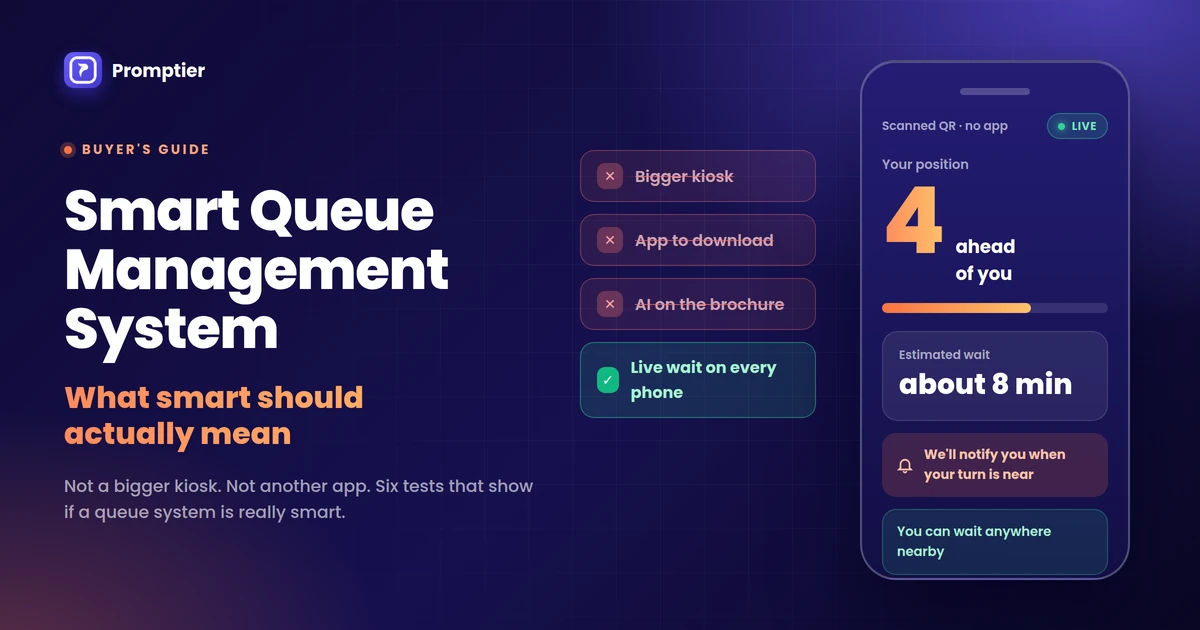
A bigger kiosk. A touchscreen token machine is still a token machine. It prints a number and tells the customer nothing about their wait.
An app to download. Asking customers to install an app at the door adds a step most people skip. The smarter route is the phone’s browser.
“AI” on the brochure. Forecasting can help very large operations, but most clinics, branches and salons don’t need it. If a product can’t show a customer their live position, an AI label won’t fix that.
More hardware. Every dispenser, printer and controller is one more thing that can jam, break or need a service visit.
A system can have all of these and still leave customers crowding the counter, asking “how much longer?”
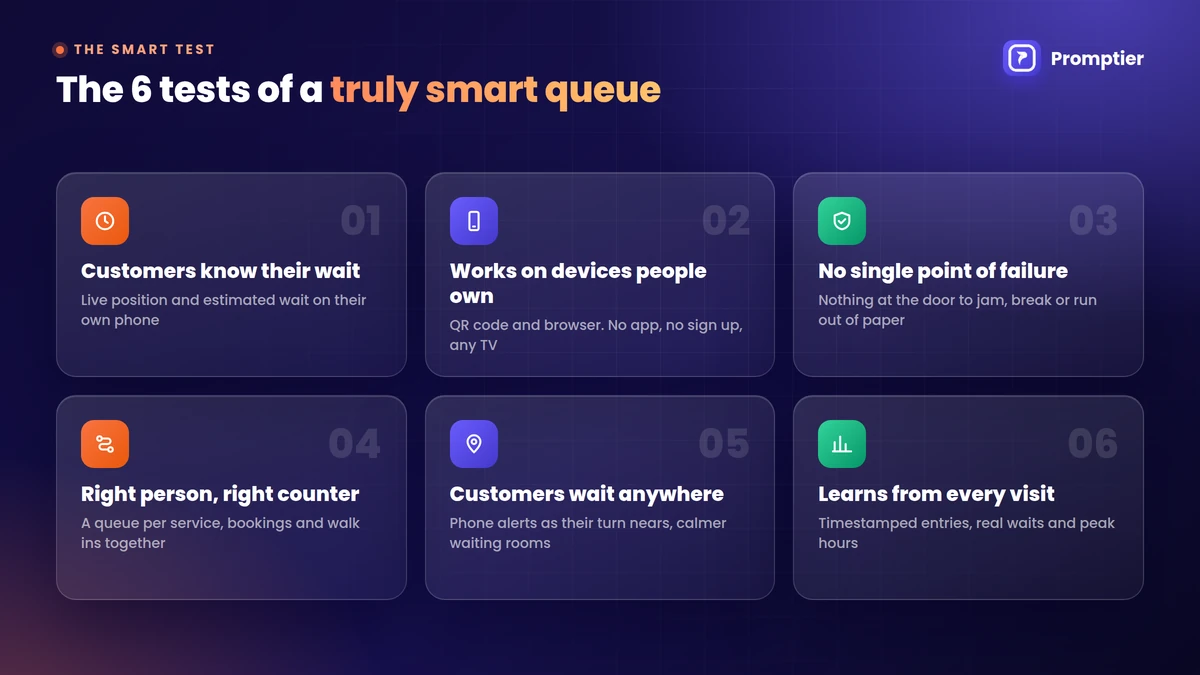
The 6 Tests of a Truly Smart Queue Management System
These six tests separate a smart system from a digital version of the old token machine.
Customers should join by scanning a QR code and follow the queue in their browser, with no app and no sign up. In India, this is easy because QR scanning is already a daily habit. UPI processed 24.51 billion transactions in August 2026, and a large share of them start with a scan. Staff should run the queue from any phone or laptop, and the waiting area display should work on any TV.
3. There’s no single point of failure
If one machine jams and the whole queue stops, the system isn’t smart. A printed QR code can’t run out of paper. Look for a system where a broken screen or a lost device is a small problem, not a shutdown. The only real dependency should be the internet, with a simple paper fallback for outages. Our cost comparison of token machines and digital queues shows what hardware failures really cost.
4. It sends people to the right place
A smart system knows that not everyone is waiting for the same thing. It should run a separate queue for each service or counter, so a two minute task doesn’t wait behind a forty minute one. It should also put booked customers and walk ins in one live list, so staff aren’t merging a diary and a token register by hand.
5. It lets customers wait anywhere
When customers are notified on their phone as their turn nears, they don’t need to stand in the room to keep their place. They can wait in their car or step out briefly. That one change makes waiting areas calmer and keeps people from walking out. Our guide to reducing walk in wait times without hiring more staff covers the operational side.
6. It learns from every visit
Every entry should be timestamped, from joining to being called to being served. That’s what turns a queue into data: real average waits, peak hours by day, and customers who left before being served. A system that can’t tell you your busiest hour isn’t smart, however modern it looks.
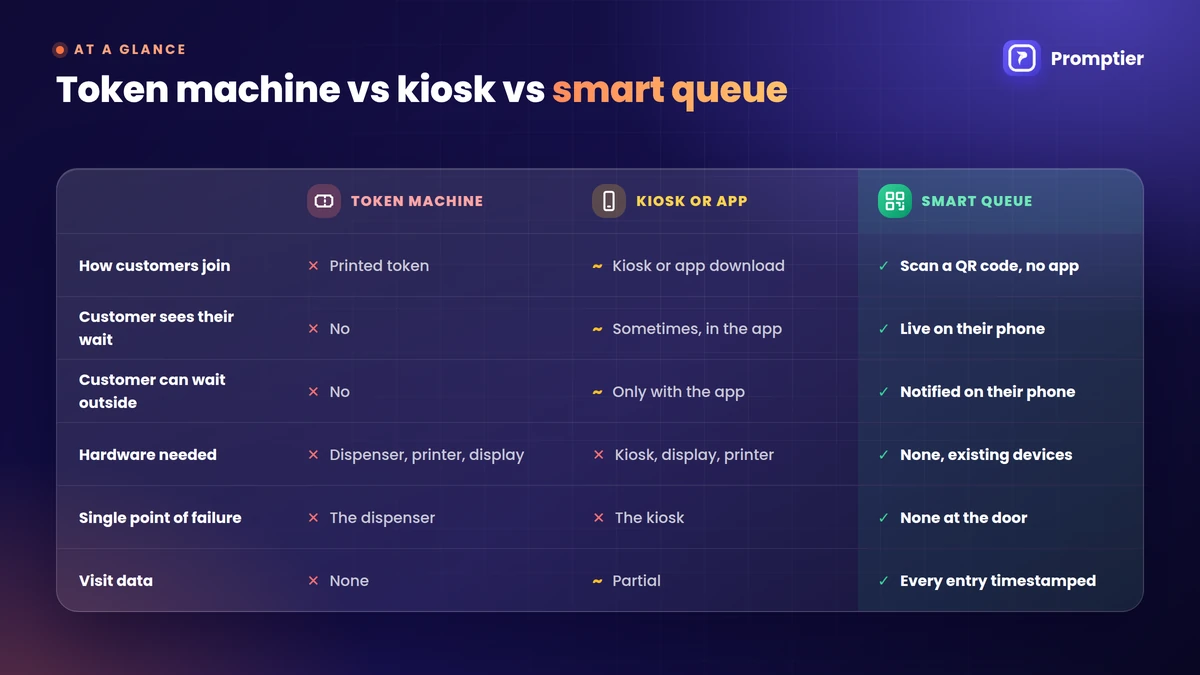
Traditional vs Smart Queue Management: At a Glance
Token machine
Kiosk or app based system
Smart queue system
How customers join
Take a printed token
Touchscreen or app download
Scan a QR code, no app
Customer sees their wait
No
Sometimes, in the app
Yes, live on their phone
Customer can wait outside
No
Only with the app
Yes, notified on their phone
Hardware needed
Dispenser, printer, display
Kiosk, display, often a printer
None, uses existing devices
Single point of failure
The dispenser
The kiosk
None at the door
Bookings and walk ins together
No
Varies
Yes, one live queue
Visit data
None
Partial
Every entry timestamped
Setup time
Vendor installation
Vendor installation
Usually the same day
Where Smart Queues Make the Biggest Difference
Clinics and hospital OPDs, where patients are unwell and shouldn’t crowd a waiting room. Indian patients already register by QR at government hospitals: the ABHA Scan and Register service has crossed 25 crore OPD registrations.
Bank branches, where cash, loans and enquiry customers need different counters.
Salons and service centres, where bookings and walk ins arrive at the same desk.
A smart queue management system is software that lets customers join a queue from their phone, shows them their live position and estimated wait, and lets staff manage the line from a live dashboard. It records every visit with timestamps, so businesses can see real waiting times and peak hours.
What makes a queue management system smart?
Six things: customers know their wait, it works on devices people already own, there’s no single point of failure, it routes people to the right counter, customers can wait anywhere, and it learns from every visit. Hardware and AI labels don’t make a system smart on their own.
Do customers need an app for a smart queue system?
No. The best smart queue systems work in the phone’s browser. Customers scan a QR code and join instantly, with nothing to install and no account to create.
Is a touchscreen kiosk a smart queue system?
Not by itself. A kiosk that prints a token still leaves customers without a live position or wait time. A queue becomes smart when customers can follow it on their phone and the business can see data from every visit.
Does a smart queue management system need AI?
No. Most service businesses get the biggest gains from live position, notifications and timestamped data. Forecasting tools can help very large operations, but they don’t replace the basics.
How much does a smart queue management system cost in India?
Browser based systems usually charge a monthly fee with no hardware. Promptier is free to start, and its Pro plan is ₹499 per month per location. Hardware based systems add the cost of dispensers, kiosks, displays and servicing.
Conclusion
“Smart” should be a promise about outcomes. A smart queue means customers know their wait, nothing at the door can jam, the right person reaches the right counter, and every visit becomes data you can use.
Judge any system by those six tests, not by the size of its screen or the words on its brochure.
Ready to see a queue that passes all six?Explore Promptier’s QR queue system and book a free demo. No hardware, no customer app, support in IST hours.
QR code queue management lets customers join a line by scanning a QR code with their phone camera. The queue opens in their phone’s browser, they see their live position, and they’re notified when it’s their turn. There’s no app to download, no token slip and no standing in line.
If you run a clinic, salon, bank branch or service counter, you’ve probably seen the moment it breaks down: a crowded waiting area, a receptionist answering “how much longer?” for the tenth time, and a paper token nobody can track. A QR code queue fixes that with a printed code and the phone already in your customer’s pocket.
This guide explains exactly how it works, from the scan to the moment a customer is called, and what to look for when you set it up.
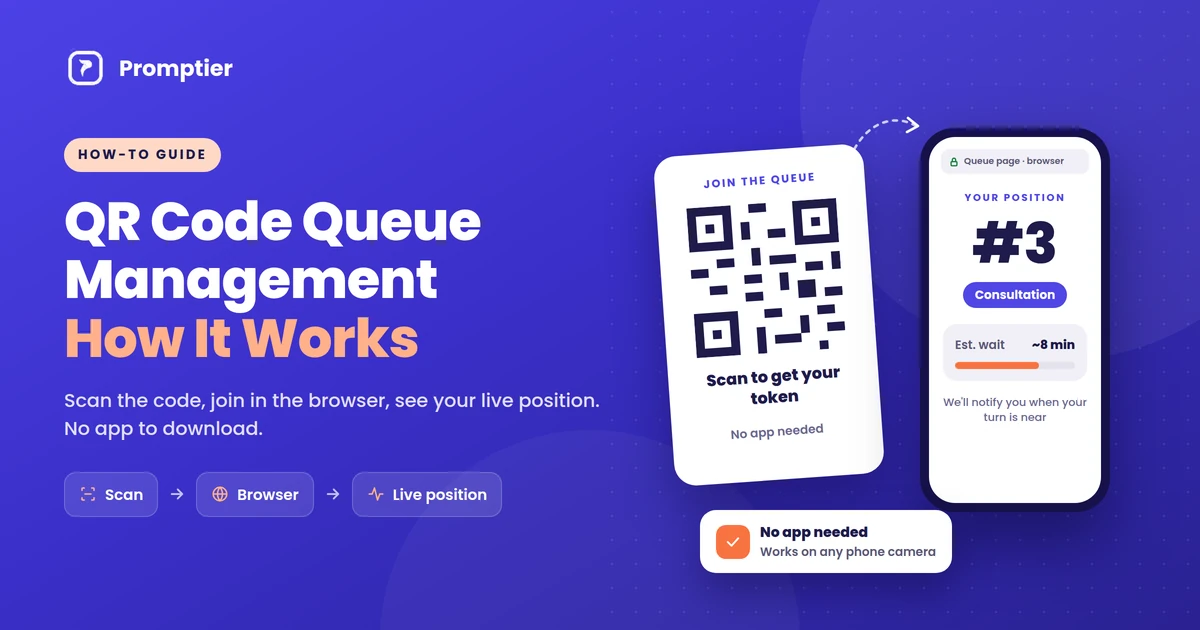
QR code queue management works in four steps. A customer scans a QR code at your entrance. A queue page opens in their phone browser, with no app needed. They pick a service and join, then see their live position and estimated wait. When staff call the next customer from a dashboard, everyone’s position updates and the customer is notified as their turn nears.
Key Takeaways
QR code queue management replaces token machines and paper registers with a printed QR code and the customer’s own phone.
No app is needed. Modern phone cameras read QR codes and open the queue as a web page in the browser.
Customers see their live position and estimated wait, and are notified as their turn approaches, so they can wait anywhere.
Staff run the queue from a dashboard on any phone or laptop, and every scan is timestamped for wait-time reports.
It suits India particularly well: UPI recorded 24.51 billion transactions in August 2026 alone, so scanning a QR code is already a daily habit for most customers.
What Is QR Code Queue Management?
QR code queue management is a way of running a waiting line where customers join by scanning a QR code instead of taking a paper token or standing in a physical line. The QR code links to a web page for your queue. Once a customer joins, their position is tracked digitally, updated in real time, and shown on their own phone.
It’s a type of virtual queue: the customer holds a place in line without physically standing in it. The difference from older virtual queues is the entry point. Instead of downloading an app or calling a number, the customer just points their camera at a code.
Key terms used in this guide:
QR code: a square barcode that stores a web address. Phone cameras can read it and open that address.
Virtual queue: a queue where people hold their place digitally and can wait anywhere.
Live position: the customer’s current place in the queue, updated every time staff call someone.
Staff dashboard: the screen staff use to see who’s waiting and call the next customer.
Queue display: a TV or monitor showing the token or name being served now.
How QR Code Queue Management Works, Step by Step
Here is the full journey, from the business printing a code to the customer being served.
Step 1: The business puts up a QR code
The business creates its queue, adds its services (for example, “Consultation” and “Reports”, or “Haircut” and “Colour”), and prints the QR code. It goes at the entrance, the reception desk and anywhere customers naturally stop. One printed code can be used every day.
Step 2: The customer scans it with their phone camera
The customer opens their phone camera and points it at the code. Built-in camera apps on iPhones and most Android phones recognise QR codes automatically and show a link to tap. Customers who use Google Lens or a UPI app’s scanner can use that too.
Step 3: The queue opens in the browser, not an app
Tapping the link opens the business’s queue page in the phone’s browser, such as Chrome or Safari. Nothing is downloaded or installed. There’s no app store, no sign-up and no password.
Step 4: The customer joins the queue
The customer picks the service they need and enters minimal details, usually a name and sometimes a phone number, so staff know who to call. They tap to join and get a place in the queue, often shown as a token number.
Step 5: They see their live position and wait anywhere
The page now shows the customer’s live position and estimated wait. Because the page stays connected to the queue, it updates on its own every time staff call someone. The customer can sit down, grab a coffee or step outside, instead of hovering near the counter.
Step 6: Staff call next, and the customer is notified
At the counter, staff see everyone waiting on a dashboard on their phone, tablet or laptop, and tap to call the next person. Every waiting customer’s position moves up at once, the lobby TV (if you use one) shows who’s being served, and the customer gets a notification on their phone as their turn approaches.
Step 7: The visit is logged
Each step is timestamped: when the customer scanned, when they were called and when they were served. Over time, that gives the business real data on average waits, peak hours and busy services, with no manual logging.
What Happens Behind the Scan
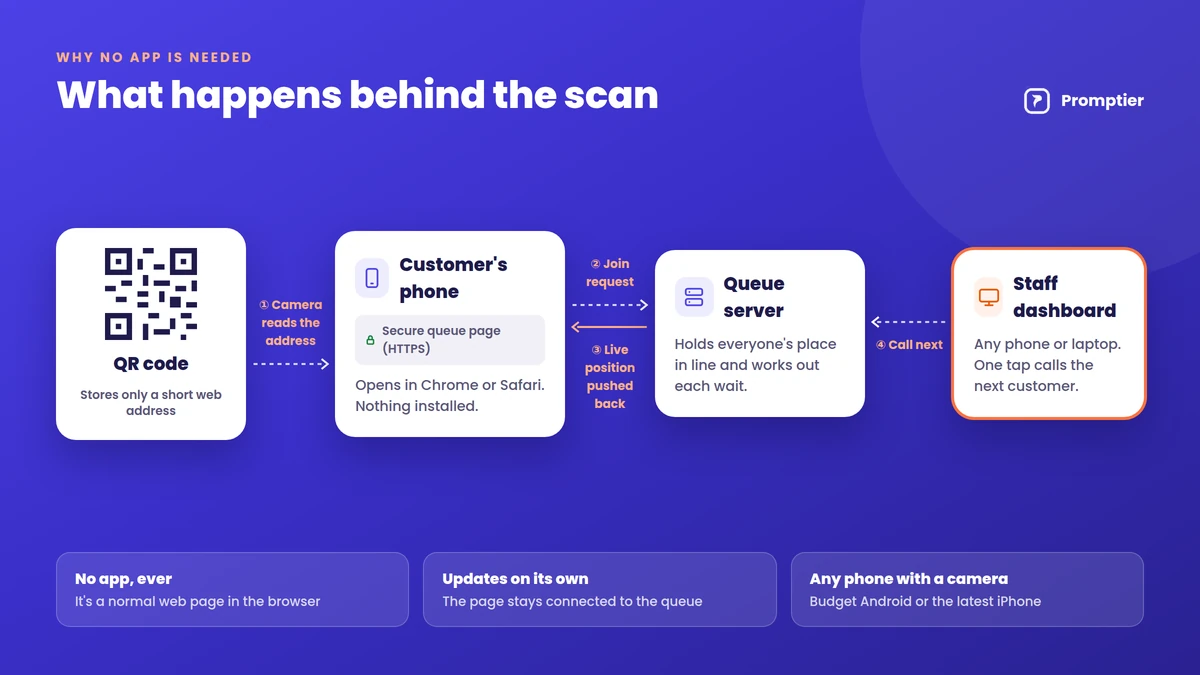
A QR code doesn’t contain the queue itself. It holds a short web address. Everything after the scan happens on a normal secure web page (HTTPS), which is why no app is needed.
The camera decodes the code and reads the web address stored in it.
The browser opens the address, loading the business’s queue page for that location.
The page registers the customer in the queue on the queue provider’s server and gives them a place.
The page stays connected, so when staff call the next person, the new position is pushed to every waiting customer’s screen.
A notification is triggered when the customer is near the front, depending on the system and the phone’s settings.
Because all of this runs in the browser, it works the same on a ₹8,000 Android phone and the latest iPhone, as long as the phone has a camera and a data connection.
Why “No App Needed” Matters
The biggest reason QR queues work is that they ask almost nothing of the customer. A queue app has to be found, downloaded, installed, opened and signed into before anyone can join a line. Most people visiting a clinic or service centre once a month won’t do that. A QR code takes one scan.
No storage or data used for an app. This matters on budget phones with limited space.
No account or password. Customers join in seconds, even on their first visit.
It works for occasional visitors. Nobody installs an app for a place they visit twice a year.
Scanning is already a habit in India. UPI recorded 24.51 billion transactions in August 2026 (Business Standard, citing NPCI), and a large share of those start with a QR scan at a shop counter. Customers who pay by scanning already know how to join a queue by scanning.
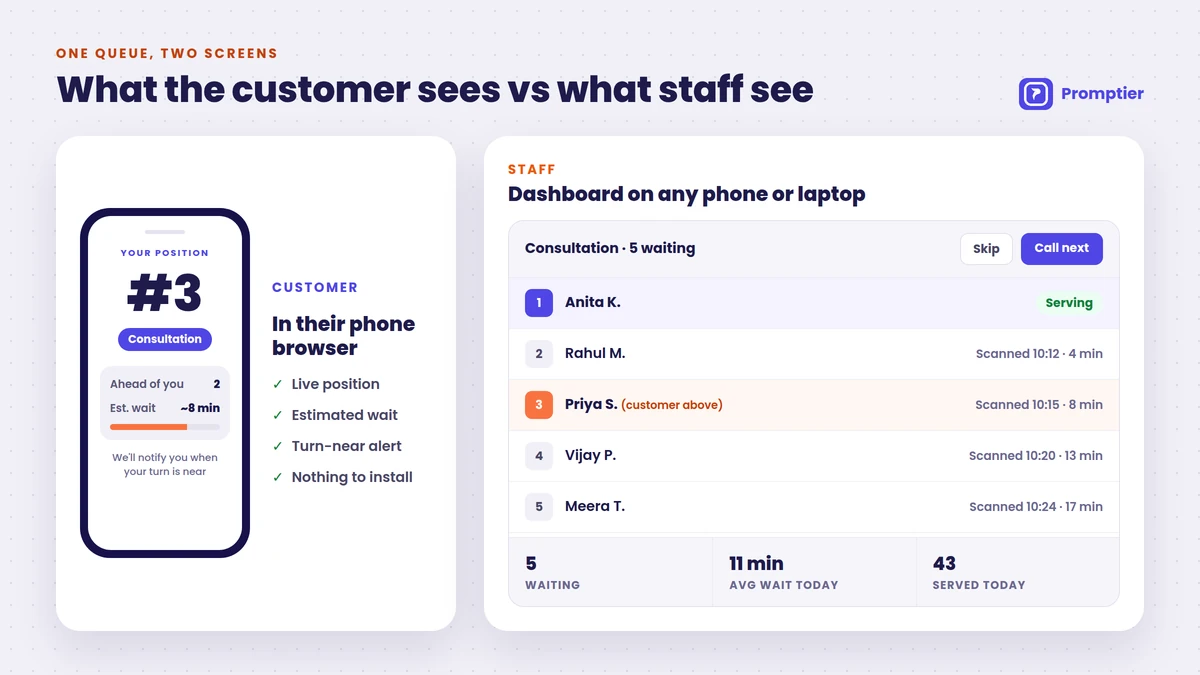
What the Customer Sees vs What Staff See
Customer (phone browser)
Staff (dashboard)
Joining
Scan QR, pick a service, tap to join
New entries appear automatically
During the wait
Live position and estimated wait
Full list of who’s waiting, per service
Being called
Notification as their turn nears
One tap to call next or skip
Afterwards
Nothing to uninstall
Timestamped record, wait-time reports
Needs
A phone with a camera and data
Any phone, tablet or laptop
QR Code Queue vs Token Machine vs Queue App
Token machine
Queue app
QR code queue
How customers join
Press a button, take a paper slip
Download app, sign up, join
Scan a QR code, join in the browser
Hardware
Dispenser, printer, paper rolls
None
None (a printed code)
Customer sees live position
No, just a number
Yes
Yes
Can wait away from the counter
No
Yes
Yes
Works for first-time visitors
Yes
Rarely (app download needed)
Yes
Wait-time data
Usually none
Yes
Yes, every scan timestamped
Typical setup
Vendor installation
Varies
Same day
A token machine gives everyone a number but no visibility. A queue app gives visibility but loses most people at the download step. A QR code queue gives the visibility of an app with the ease of a token. If you’re comparing costs, see our token machine vs digital queue cost comparison.
Where QR Code Queue Management Works Best
It fits anywhere people arrive without a fixed slot and wait to be served:
Clinics and hospital OPDs: patients wait in the car or cafeteria instead of a crowded corridor. See hospital queue management.
Banks and NBFCs: separate QR queues for cash, loans and enquiries.
Salons and barbershops: walk-ins join from the door and come back when their chair is ready.
Service centres and government offices: long waits become manageable when people aren’t stuck in one room.
Restaurants and cafés: a waitlist for tables that guests can leave and come back to.
How to Set Up a QR Code Queue
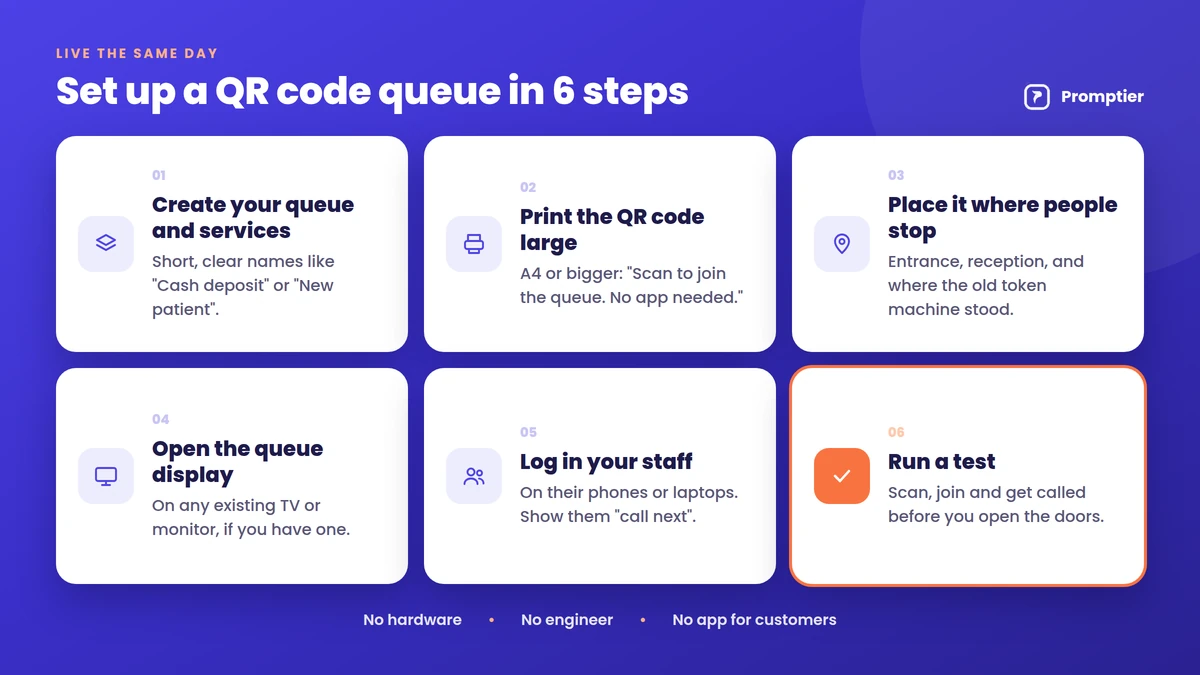
Most businesses can go live the same day with a QR queue system like Promptier:
Create your queue and services. Keep service names short and clear, like “Cash deposit” or “New patient”.
Print the QR code large. A4 or bigger, with one line underneath: “Scan to join the queue. No app needed.”
Place it where people stop, at the entrance, reception and wherever your old token machine stood.
Open the queue display on an existing TV or monitor, if you have one.
Log in your staff on their phones or laptops and show them “call next”.
Run a test: scan, join and get called before you open the doors.
Keep a staffed desk or a tablet at reception where staff can add walk-ins to the same queue on the customer’s behalf. Everyone ends up in one line, however they joined.
“What if the internet is slow?”
The queue page is light and needs only a basic mobile data connection. For the business side, keep a simple fallback, such as a paper register, for outages.
“Is it safe for customers to scan a QR code?”
A QR code only opens a web address. Customers should check that the page belongs to your business before entering details. Use a branded, laminated code, and check it regularly so no one has stuck a fake code over it.
“What data do customers share?”
Usually just a name and sometimes a phone number, only what’s needed to call them. In India, that’s personal data under the DPDP Act, 2023, so show a short notice explaining how it’s used.
“What if a customer’s phone battery dies?”
They can tell the front desk their name or token number, and staff can find them in the dashboard.
How Promptier Handles QR Queues
Promptier is a QR code queue management system built for Indian businesses. It runs on the phones, laptops and screens you already have.
Scan and join in the browser. Customers point their camera at your QR code and join with a tap. No app store, no download, no sign-up wall.
Live position and estimated wait. The estimate updates in real time, and customers are notified as their turn approaches.
Staff dashboard on any device. Call next, skip, and see who’s waiting at a glance.
Queue display on any TV. Show the queue on an existing smart TV or monitor.
Timestamped data. Every scan is logged automatically, with average waits and peak hours.
Pricing. Free to start. The Pro plan is ₹499 per month per location. No hardware to buy.
QR code queue management is a way of running a waiting line where customers join by scanning a QR code with their phone. The queue opens in their browser, shows their live position and estimated wait, and notifies them when their turn is near. It replaces paper tokens and physical lines.
Do customers need to download an app to join a QR code queue?
No. The QR code opens a web page in the phone’s browser, such as Chrome or Safari. Customers join there with a tap. There’s nothing to download, install or sign up for.
How does a customer know when it’s their turn?
The queue page shows their live position and estimated wait, updating each time staff call someone. As their turn approaches, they get a notification on their phone, and the lobby TV, if used, shows who’s being served.
Does a QR code queue work on all phones?
It works on any smartphone with a camera and a data connection. Built-in camera apps on iPhones and most Android phones read QR codes directly, and Google Lens or a UPI app’s scanner works too.
What if a customer doesn’t have a smartphone?
Staff can add them to the same queue from the front desk or a reception tablet. They wait in the same line as everyone else and are called by name or token number.
How much does a QR code queue management system cost?
It’s much cheaper than hardware. Promptier is free to start, and its Pro plan costs ₹499 per month per location. There’s no dispenser, kiosk or paper to buy, because the only physical item is a printed QR code.
How long does it take to set up?
Most businesses go live the same day. You create your services, print the QR code, open the dashboard on an existing phone or laptop and run a test scan.
Conclusion
QR code queue management works because it removes every step customers resist. There’s no app to download, no account to create and no line to stand in: just a scan, a browser page and a live position that updates on its own. Businesses get a calmer waiting area and real wait-time data, and all they have to install is a printed code.
A digital queue management system and a paper token dispenser do the same basic job: they decide who gets served next. The difference is everything around that job. One hands your customer a slip with a number. The other puts their place in line on their phone, tells them how long the wait is, and records every visit.
If you already run a token dispenser, you’re not starting from zero. Your customers understand tokens, your staff know how to call numbers, and the system mostly works. So the real question isn’t “paper or digital?” in the abstract. It’s whether switching would make your counter noticeably better, and what you’d give up.
This guide compares the two side by side, point by point, from the view of a business that uses a token dispenser today.
A paper token system gives each customer a printed number and nothing else. A digital queue management system gives the same token number on the customer’s phone, plus their live position, an estimated wait and a notification when their turn is near. It needs no dispenser or paper, works on devices you already own, and logs every visit so you can see real wait times. Paper tokens still suit places where most customers don’t carry smartphones or the internet is unreliable.
Key Takeaways
Both systems keep your “Token 42, Counter 3” routine. The digital version adds what the paper slip can’t: live position, estimated wait and a turn alert.
A token dispenser is hardware. It needs paper rolls, servicing and a working printer. A digital system runs on phones, laptops and TVs you already have.
Paper tokens leave no record. A digital system timestamps every visit, so you can see average waits, peak hours and which counter is overloaded.
Paper still wins in a few places: very low smartphone use, weak connectivity, or a counter that serves only a handful of people a day.
You don’t have to switch overnight. Many businesses run both for a few weeks, then retire the dispenser.
How a Paper Token System Works
A paper token system is the familiar box by the door. A customer presses a button, the machine prints a numbered slip, and a display near the counters shows which number is being served. Staff call the next number when they’re free.
It’s simple and it works. It stops people pushing to the front, and nobody needs a phone or any training. That’s why token dispensers are still common in banks, clinics, RTOs and service centres across India.
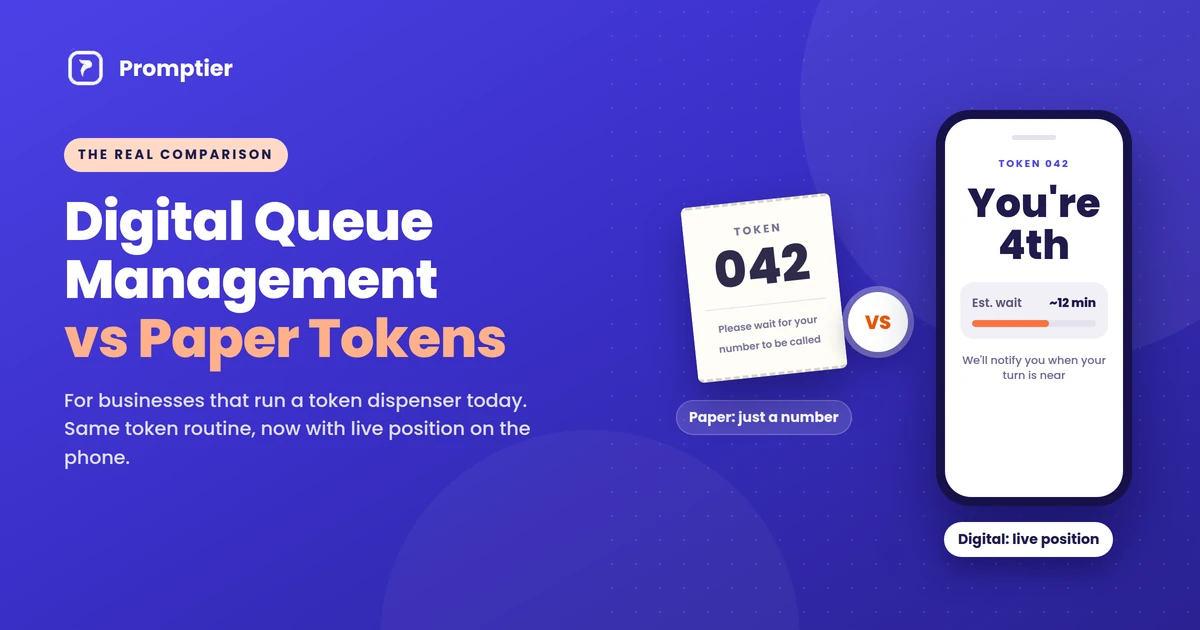
But the slip carries one piece of information: a number. It doesn’t tell the customer how many people are ahead, how long the wait will be, or when to come back. So customers stay in the waiting area and watch the display. And when the day ends, the business has no record of how long anyone actually waited.
How a Digital Queue Management System Works
A digital queue management system replaces the dispenser with a QR code and the customer’s own phone.
The customer scans a QR code at the entrance with their phone camera.
The queue opens in their browser. There’s no app to download and no sign up.
They pick a service and get a token, the same kind of number they’d get from a dispenser.
They see their live position and estimated wait, which update every time staff call someone.
Staff call the next token from a dashboard on a phone or laptop, and the lobby TV shows who’s being served.
The customer is notified on their phone as their turn approaches.
Every step is timestamped, so the business gets real data on waits and busy hours.
The routine at the counter barely changes. Staff still call numbers and customers still go to the counter shown on the screen. What changes is that the customer knows where they stand, and you know what’s happening across the day.
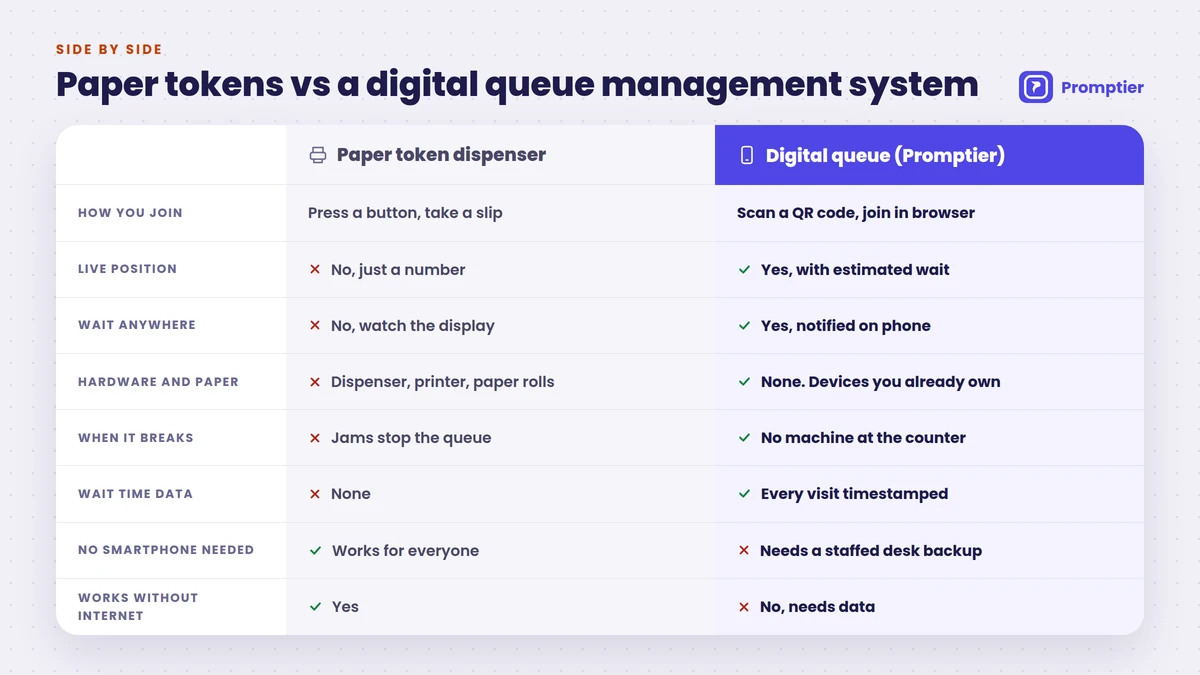
Digital Queue Management vs Paper Tokens: Side by Side
Here is the full comparison, point by point.
Paper token system (dispenser)
Digital queue management system
How customers join
Press a button, take a printed slip
Scan a QR code, join in the phone browser
What the customer gets
A number on paper
A token number plus live position and estimated wait
Knowing when to come back
Watch the display, stay nearby
Notified on their phone as their turn nears
Waiting area
Everyone waits in the room
Customers can wait anywhere
Hardware
Dispenser, printer, often a dedicated display
None new. Phones, laptops and an existing TV
Consumables
Paper rolls, sometimes ink
None
When it breaks
Jams or runs out of paper, and the queue stops
No machine at the counter to jam
Separate queues per service
Needs extra buttons or extra machines
Add a service in the dashboard in minutes
Setup
Vendor delivery and installation
Self setup, often live the same day
Records
None. The slip goes in the bin
Every visit timestamped
Wait time reports
Guesswork
Average waits, peak hours, counter load
Disputes (“my number was skipped”)
Hard to check
Timestamped record settles it
Customers without smartphones
Works for everyone
Needs a staffed desk or tablet as backup
Works without internet
Yes
No. Needs a data connection
Upfront cost
About ₹9,000 to ₹40,000+ per unit
Free to start, then a monthly plan
The table shows a clear pattern. A digital queue management system wins on information, flexibility and upkeep. Paper tokens win on two things: they work for every customer, and they work with no internet at all.
What the Comparison Means Day to Day
For your customers
With a paper token, the wait is a blind spot. The customer holds token 42, sees 31 on the screen, and has no idea whether that means 10 minutes or 40. So they stay put, often standing, and ask the front desk for updates.
With a digital queue, the same customer sees “You’re 4th, about 12 minutes” on their phone. They can sit in the car, finish a call or grab tea, and come back when they’re notified. The wait may be just as long, but it feels shorter because they know what’s happening.
For your counter staff
Paper tokens leave staff answering the same question all day: “How much longer?” They also deal with the machine itself. They reload paper, clear jams, and sort out the argument when two people hold the same number or someone claims they were skipped.
A digital system takes most of that away. Customers can see their own position, so the questions drop. Staff call the next token with one tap, and there’s no printer to look after.
For you, the owner or manager
This is where the gap is widest. A token dispenser can’t tell you anything. You don’t know your average wait, your busiest hour, or whether Counter 2 is overloaded while Counter 4 sits idle.
A digital system records every visit with a timestamp. After a few weeks you can see, in real numbers, when to add a second person on the counter, which service slows the whole line, and whether your changes are working.
Where Paper Tokens Still Make Sense
A fair comparison has to say where paper wins. A token dispenser is still the better fit if:
Most of your customers don’t carry smartphones. This is common in some rural outlets and among older customers.
Your internet is unreliable. A digital queue needs a data connection for staff and customers.
You serve only a few people a day. If there’s rarely more than two or three people waiting, a queue system of any kind may be more than you need.
For everyone else, the main reasons to keep a dispenser are habit and the money already spent on it. Neither is a strong reason to keep paying for paper rolls and repairs.
The Hidden Costs of a Token Dispenser
The purchase price is only the start. A dispenser in India typically costs about ₹9,000 for a basic thermal unit, up to ₹40,000 or more for a full electronic system with a display. On top of that come:
Paper rolls, bought again and again
Servicing and repairs, often under an annual maintenance contract
Downtime, when the machine jams on a busy morning and the line turns into a crowd
More hardware to grow, because adding a service or a counter often means another machine
Yes, and for most token dispenser users it’s the safest way to switch. Keep the dispenser running for a few weeks while you put up the QR code beside it. Regular customers can carry on as usual, and new or curious ones can try the phone queue.
Once most people are scanning instead of pressing the button, retire the dispenser. You can keep a staffed desk or a tablet at reception to add customers without smartphones to the same digital queue, so nobody is left out.
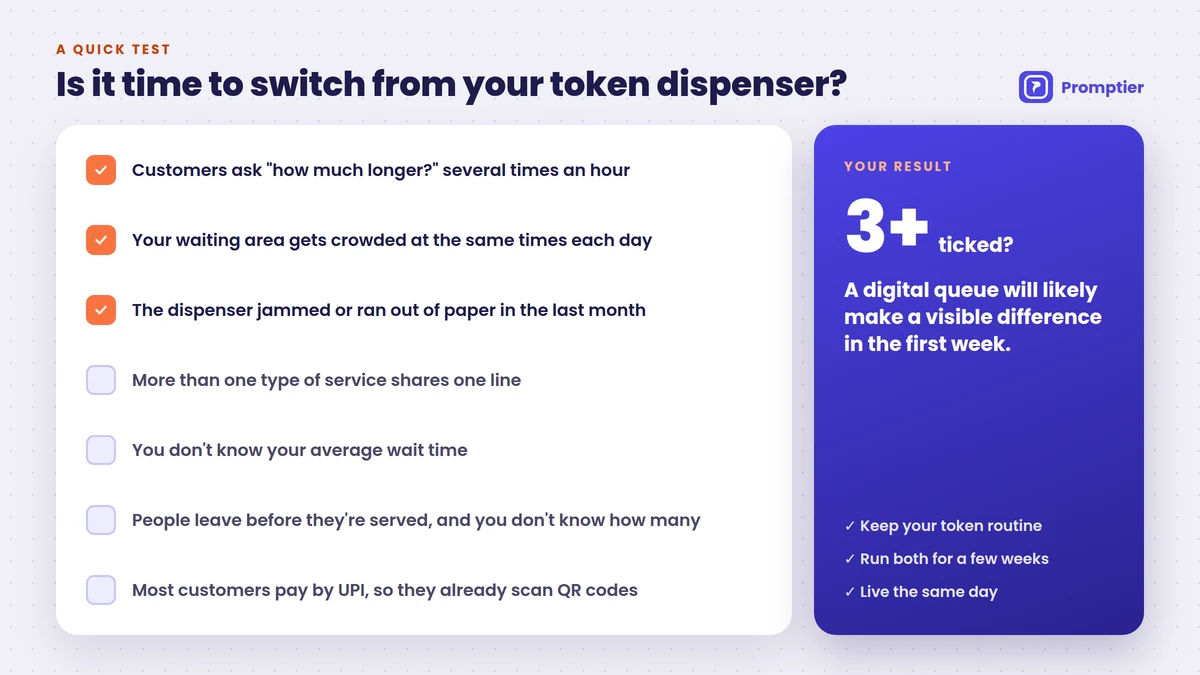
A Quick Test: Is It Time to Switch?
Tick the statements that apply to your counter:
Customers ask “how much longer?” several times an hour
Your waiting area gets crowded at the same times each day
The dispenser has jammed or run out of paper in the last month
You have more than one type of service sharing one line
You don’t know your average wait time
People leave before they’re served, and you don’t know how many
Most of your customers pay by UPI, so they’re used to scanning QR codes
If you ticked three or more, a digital queue will likely make a visible difference within the first week. The last point matters in India: UPI recorded 24.51 billion transactions in August 2026 alone (Business Standard, citing NPCI), and a large share of those start with a QR scan. Customers who pay by scanning already know how to join a queue by scanning.
How to Move From a Token Dispenser to Promptier
Promptier keeps the token routine your staff and customers already know, and moves it onto their phones. Most businesses are live the same day.
Create your queues for each service, like “Cash”, “Enquiry” or “Consultation”.
Print the QR code and place it right next to the dispenser, where regular customers already look.
Open the display on your existing lobby TV, so called tokens show up just as before.
Log in your staff on their phones or laptops and show them “call next”.
Run both for a few weeks, then retire the dispenser once most customers are scanning.
What is the difference between a digital queue management system and a paper token system?
A paper token system prints a numbered slip that shows only the customer’s number. A digital queue management system gives the same token on the customer’s phone, plus their live position, an estimated wait and a notification when their turn is near. It also records every visit, which a paper system can’t do.
Is a digital queue management system better than a token dispenser?
For most businesses, yes. It removes paper rolls and jams, lets customers wait anywhere, and gives you real wait time data. A token dispenser is still the better fit where most customers don’t have smartphones or the internet is unreliable.
Do customers need an app to use a digital queue?
No. With Promptier, customers scan a QR code and join in their phone browser. There’s nothing to download and no account to create.
What happens to customers who don’t have a smartphone?
Keep a staffed desk or a tablet at reception where staff can add them to the same queue. They’re called by token number just like everyone else.
Can I keep my token dispenser while I switch?
Yes. Many businesses run both for a few weeks. Put the QR code next to the dispenser, let customers choose, and retire the machine once most people are scanning.
How much does a digital queue management system cost compared with a token machine?
A token dispenser typically costs about ₹9,000 to ₹40,000 or more per unit, plus paper and servicing. Promptier is free to start, and its Pro plan costs ₹499 per month per location, with no hardware to buy.
How long does it take to switch?
Most businesses go live the same day. You create your services, print the QR code, open the display on an existing TV and log in your staff.
Conclusion
Paper tokens solved an old problem: stopping people from pushing to the front. A digital queue management system solves that too, then goes further. Customers know where they stand, staff stop answering “how much longer?”, and you finally see what’s happening at your counter.
If your dispenser still works, you don’t have to throw it out tomorrow. Put a QR code next to it, run both for a few weeks, and let your customers show you which one they prefer.
Most small businesses that run on walk-ins — barbershops, clinics, restaurants, single-branch banks — still manage their line the same way they did a decade ago: a paper sign-in sheet, a token dispenser, or a staff member shouting “next.” Meanwhile, the customer standing in that line has a phone in their pocket that could tell them exactly how long the wait is, and let them wait somewhere other than the doorway. A queue management system is the software (and sometimes hardware) that closes that gap: it lets customers join a line remotely, see their position and estimated wait, get notified when it’s their turn, and gives the business a live view of demand instead of a guess.
This guide is for owners and managers of small and growing service businesses — not enterprise IT buyers evaluating a bank-wide rollout. You’ll learn what a queue management system actually is, the real benefits it delivers, how it works end to end, the 8 features worth paying for, and the mistakes that turn a good idea into an ignored app nobody uses.
The numbers back up why this matters. Customers report waiting as the single most frustrating part of visiting a business, and 86% say they’ll switch to a competitor after a bad wait experience. The global queue management system market is projected to grow from roughly USD 43.67 billion in 2026 to USD 77.13 billion by 2031, and Asia-Pacific — India included — is the fastest-growing region. The businesses adopting this early aren’t doing it for the technology. They’re doing it because a five-minute cut in wait time measurably brings customers back.
Key Takeaways
A queue management system lets customers join a line remotely (QR code, link, or kiosk), see live wait estimates, and get notified when it’s their turn — instead of standing in a physical line.
73% of customers say waiting is the most frustrating part of visiting a business, and 86% will switch providers after a bad wait experience, according to 2026 customer-waiting research.
You don’t need enterprise pricing to get enterprise-grade queuing. Small businesses can run a full digital queue — QR joining, SMS alerts, TV display, analytics — for a few hundred rupees a month, not a multi-lakh annual contract.
Real-time wait-time transparency reduces how long a wait feels by around 35%, even when the actual wait doesn’t change — perceived wait time matters as much as actual wait time.
A queue management system only pays off when it changes something operationally: staffing at peak hours, which services need more people, or which days need a second person at the counter. A digital queue nobody looks at is just a fancier paper list.
What Is a Queue Management System?
A queue management system is software (often paired with simple hardware like a TV display or kiosk) that lets customers join a line digitally, shows them a live wait estimate, notifies them when it’s their turn, and gives the business real-time and historical data on customer flow.
At its core, every queue management system answers four questions for the customer: where am I in line, how long will it take, do I need to stand here, and how will I know when it’s my turn. And it answers a parallel set of questions for the business: how many people are waiting right now, which staff member should serve them, when are we about to get busy, and where in the process do people get frustrated or leave.
Queue management systems break into two layers. The software layer includes online and walk-in queue joining, virtual queuing via QR code or SMS, automated wait-time estimates and notifications, staff-to-service assignment, and analytics on visits, no-shows, and peak hours. The hardware layer, which is optional for most small businesses, includes self-service kiosks, ticket printers, and TV or tablet displays showing “Now Serving.”
The distinction that matters most for a small business is between a queue and a line. A line requires physical presence — you have to stand there to hold your place. A queue is just an ordered list of who’s next; it doesn’t require anyone to be standing anywhere. Digital queue management systems turn a line into a queue, which is the entire point: the customer’s time is freed up, and the business still serves people in the correct order.
Key definitions you’ll see throughout this guide:
Actual wait time: the real, measured duration a customer waits before being served.
Perceived wait time: how long the wait feels to the customer — often longer or shorter than the actual time, depending on visibility and communication.
Virtual queue: a queue a customer joins remotely (QR code, link, SMS) and can wait through without being physically present.
No-show rate: the percentage of customers who join a queue or book an appointment and never arrive to be served.
Why Queue Management Matters for Small and Growing Businesses
Queue management matters because an unmanaged line is a silent source of lost customers — most of whom never complain, they just don’t come back. Small businesses that digitize their queue typically recover walk-aways, cut perceived wait time, and get their first real data on foot traffic.
Consider what an abandoned queue actually costs a small business. Customers tolerate a wait of roughly 8 minutes on average before leaving, though the threshold varies by category — around 10 minutes in retail, 25 minutes at a salon or barbershop, and up to 20 minutes past an appointment time at a clinic. Every customer who leaves during that window isn’t a complaint you’ll hear; they’re a booking you’ll never see. Industry research puts the toll from wait-driven walkouts at tens of thousands of dollars a year for a mid-sized walk-in business, and 30% of customers who leave a queue don’t come back within 30 days.
Queue data also settles disagreements that otherwise run on gut feeling. When a barbershop owner insists Saturdays “aren’t that busy” but the queue log shows a 22-minute average wait between 11 AM and 1 PM every single Saturday, the conversation about adding a second chair on weekends changes completely. That’s not a guess anymore, it’s a pattern.
There’s an honest limitation here too: a queue system tells you that people are waiting and when, not always why. A growing wait time could mean you’re understaffed, a specific service is taking longer than scheduled, or you’re simply busier than you were three months ago and it’s a good problem to have. The system tells you where to look. It doesn’t replace looking.
📊 Key Stat: Negative wait experiences generate roughly 2.5x more online reviews than positive ones. For a small, locally-searched business, that asymmetry means a handful of bad wait days can do outsized damage to a Google rating that took years to build.
Key Benefits of a Queue Management System
The primary benefit of a queue management system is a shorter, less frustrating wait — for the customer and the business alike — because appointments and walk-ins are scheduled around real demand instead of guesswork, with real-time notifications and displays cutting how long a wait feels by around 35%.
Better resource allocation. Appointment scheduling built into the queue system means you know how many people to expect and when, instead of reacting to whoever walks through the door.
Shorter actual wait times. Live tracking of who’s in line and how long each service takes surfaces bottlenecks — a specific chair, a specific counter, a specific time slot — that a paper list simply can’t show you.
Less anxiety, more patience. SMS and push notifications tell customers exactly where they stand, and research shows 59% of customers will tolerate a longer wait if they’re getting progress updates along the way.
Lower perceived wait time. A TV or lobby display showing live queue status makes the same 15-minute wait feel shorter, because uncertainty — not just duration — is what customers find frustrating.
Freedom to wait anywhere. A mobile ticket or QR-based queue lets a customer run an errand, sit in their car, or grab a coffee instead of standing at your door. 67% of customers now prefer this kind of smartphone-based queuing over a physical line.
Smarter staffing decisions. Real-time and historical queue data shows you exactly when your peak hours are, so you can schedule staff around demand instead of a fixed roster that’s wrong half the week.
The right staff for the right customer. Matching a customer’s need to the staff member trained for it — a specific stylist, a specific doctor, a specific service counter — cuts down on re-routing and wasted time.
A more personal experience. Recognizing repeat customers and their usual service or preferences, something a digital system can do automatically that a paper sheet never could.
Visibility into what’s actually broken. Queue and no-show data expose exactly where customers drop off — a long gap before appointments, a specific day that’s chronically overbooked — long before it shows up in a bad review.
Dimension
Without a Queue System
With Digital Queue Management
Wait visibility
Customer has no idea how long it’ll take
Live position and wait estimate on their phone
Staffing
Fixed schedule regardless of demand
Staffing adjusted to real peak-hour data
No-shows
Untracked, absorbed as “normal”
Tracked, with reminders that reduce them
Customer experience
Stand in a physical line
Wait anywhere, get notified when it’s time
Business insight
Owner’s gut feeling
Actual visit, wait-time, and peak-hour data
💡 Pro Tip: If you can only start with one feature, start with SMS/push notifications. It’s the cheapest change to make and the one customers notice first — knowing they don’t have to watch the door is often the single biggest satisfaction driver in the whole system.
How a Queue Management System Works: From Walk-In to Served
A queue management system runs on a simple four-stage loop: a customer joins the queue (QR code, link, or walk-in), waits wherever they want while the system tracks their position, gets notified as their turn approaches, and is served — with every step logged for later analytics.
Stage 1: Join
Input: A customer arriving at your shop, or opening your booking link from home.
Process: The customer scans a QR code at the door, taps a link, or is added to the queue by staff for a true walk-in. No app download is required — this single detail is what determines whether customers actually use the system or quietly ignore it.
Output: A ticket with a queue position and an estimated wait time, visible instantly on the customer’s own phone.
Stage 2: Wait
Input: The ticket from Stage 1 and the current queue state.
Process: The customer is free to leave the premises. The system recalculates their estimated wait continuously as the queue moves, based on real service times, not a fixed average.
Output: A live, self-updating wait estimate the customer can check anytime, with no need to ask staff “how much longer.”
Stage 3: Notify
Input: The customer’s live position and your configured “heads-up” threshold (for example, notify at 3 people remaining).
Process: An SMS or push notification fires automatically as their turn nears, giving them time to walk back without rushing or missing their slot.
Output: A customer who arrives at the counter right when it’s their turn — not 15 minutes early, not after being skipped.
Stage 4: Serve
Input: The customer’s arrival and the staff member assigned to their service.
Process: Staff calls the customer via the TV/lobby display or an in-app alert, and the visit is logged — service type, staff member, actual wait time, and duration.
Output: A completed, timestamped visit record that feeds directly into your analytics dashboard.
Stage
Cadence
Owner
Typical Tooling
Join
Continuous
Customer (self-service)
QR code, booking link, staff-added walk-in
Wait
Continuous
System
Live queue position, wait estimate
Notify
Automated, threshold-based
System
SMS / push notification
Serve
Per visit
Staff
TV/lobby display, call-to-serve
Best Practices for Implementing a Queue Management System
The single most impactful practice is making joining the queue effortless — no app download, no account creation. A queue system customers find annoying to join gets abandoned in favor of just standing in line, which defeats the entire purpose.
Remove every barrier to joining. Before: a system that requires downloading an app and creating an account, so only a fraction of walk-ins ever use it. After: a QR code or link that opens straight to the queue, no install required. Businesses that drop the app requirement see meaningfully higher queue adoption in the first week alone.
Combine appointments and walk-ins in one queue. Before: appointment customers and walk-ins are managed on two separate systems, so staff can’t see the true picture of who’s waiting. After: both flow into a single queue view, so a walk-in isn’t accidentally served ahead of a booked appointment, or vice versa.
Set a realistic notification threshold. Before: customers are notified only when it’s literally their turn, giving them no time to walk back. After: a “3 people ahead” heads-up notification, so customers arrive on time instead of scrambling.
Segment by service type, not just by counter. Before: one blended queue hides the fact that a specific service (a haircut-and-color, a specialist consultation) is what’s actually driving long waits. After: service-level data shows exactly which offering needs a schedule adjustment.
Put the display where customers can actually see it. Before: a queue status screen tucked behind the counter that only staff can see. After: a TV or tablet visible from the waiting area — visible progress is what lowers perceived wait time, not the software running in the background.
Review the data monthly, not just when something breaks. Before: the analytics dashboard is opened only after a bad Google review. After: a 15-minute monthly look at peak hours, no-show rate, and average wait, so staffing decisions are proactive instead of reactive.
⚠️ Watch Out: The most common failure mode isn’t picking the wrong software. It’s picking the right software and never looking at the data it collects. If a quarter passes with no staffing or scheduling change traceable to your queue data, you’ve bought a nicer-looking token machine, not a queue management system.
Condition
Recommended Action
Expected Outcome
High walk-away rate during a known peak window
Add staff or a second service point during that window
Fewer walkouts without hiring full-time
Customers confused about how to join
Put a large, visible QR code at the entrance and on the website
Higher self-service queue adoption
High no-show rate on booked appointments
Turn on automated SMS reminders 24 hours and 1 hour before
No-shows typically drop noticeably within weeks
One service consistently backs up the whole queue
Segment that service into its own sub-queue or add a specialist
Overall average wait time recovers
Common Challenges and How to Solve Them
The most common challenge is low adoption — customers defaulting back to standing in line because joining digitally felt like more effort than just waiting. Every other challenge is smaller than this one.
Challenge: Customers Don’t Use It
If the queue system requires an app download, an account, or more than a few taps, most walk-in customers will simply stand in line the old way. Solution: use a no-app, QR-code-or-link system, and put a physical sign at the entrance explaining it takes 10 seconds.
Challenge: Staff Reverts to the Old Way During Busy Periods
Under pressure, it’s tempting for staff to just call out names instead of using the system. Solution: make the digital call-to-serve faster than shouting — a one-tap “call next” button and an auto-updating TV display remove the friction that causes staff to skip it.
Challenge: Data Looks Wrong or Inconsistent
Manually added walk-ins, forgotten “mark as served” steps, and duplicate entries quietly corrupt your wait-time and staffing data. Solution: a short weekly habit of checking that every visit was properly closed out keeps the numbers trustworthy.
Challenge: One Bad Day Skews the Averages
A single unusually busy Saturday, or a day with a staff no-show, can make your monthly average wait time look far worse than a normal day actually is. Solution: look at the trend over several weeks, and note outlier days rather than reacting to any single day’s number.
Challenge: No Time to Look at the Dashboard
Owners running the counter themselves rarely have time to dig through analytics at the end of a long day. Solution: pick one number to check weekly — average wait time or no-show rate — instead of trying to review everything.
Real-World Use Cases
Small businesses that switch from paper or token queues to a digital system typically recover walk-aways within the first month and get their first real visibility into peak-hour staffing needs within a quarter.
Independent barbershop, 3 chairs. Problem: Saturday walk-ins routinely backed up 25+ minutes, and the owner suspected — but couldn’t prove — that customers were leaving without saying anything. Intervention: switched from a paper sign-in sheet to a QR-code queue with SMS alerts, letting customers wait at the café next door. Outcome: queue data confirmed a consistent 11 AM–1 PM surge every Saturday; adding a part-time third chair during that window cut the average Saturday wait roughly in half, and no-shows for the newly added slot-based bookings stayed near zero because of automated reminders.
Single-location dental clinic. Problem: patients frequently arrived on time only to sit in the waiting room 20+ minutes past their appointment, generating friction at check-in and a steady trickle of one-star reviews mentioning “long waits.” Intervention: moved to appointment-plus-walk-in queue management with a lobby display and SMS updates when the clinic was running behind. Outcome: patients reported feeling less frustrated even on days the actual wait didn’t change, because they could see their position and got proactive notice of delays — reflecting the same perceived-wait effect seen broadly in customer research.
Small private bank branch. Problem: a single branch handling both quick transactions (passbook updates, cash deposits) and long ones (loan consultations) in one line meant a five-minute customer routinely waited behind a forty-minute one. Intervention: split the queue by service type, so quick transactions and consultations moved through separate lines feeding the same counters. Outcome: average wait time for routine transactions dropped sharply, and staff could see at a glance which service type was backing up and reassign a teller accordingly.
💡 Pro Tip: All three examples share the same root fix: segmenting the queue by service type or time window. Before adding staff or hours, check whether your real problem is one specific bottleneck hiding inside a single blended line.
8 Features to Look for in a Queue Management System
No-app QR joining and real-time SMS notifications matter most for a small business, because adoption is the whole game — a feature-rich system nobody uses is worth less than a simple one everybody does.
No-app, QR-code or link-based joining. Definition: customers join the queue by scanning a code or tapping a link, with no download or account required. Why it matters: this single feature determines whether customers actually use the system. Look for: a QR code you can print and place at the entrance, and a link you can add to your website or Google Business listing.
Real-time wait estimates. Definition: a continuously updating estimate of how long a customer will wait, based on actual service times rather than a fixed average. Why it matters: uncertainty, not duration, is what customers find most frustrating. Look for: estimates that recalculate as the queue moves, not a static number set once.
SMS and push notifications. Definition: automated alerts as a customer’s turn approaches. Why it matters: lets customers leave the premises and come back on time. Look for: a configurable “heads-up” threshold (e.g., notify at 3 people remaining).
TV or lobby display. Definition: a visible screen showing live queue status and “now serving.” Why it matters: visible progress reduces perceived wait time even when actual wait time doesn’t change. Look for: a display mode that works on any spare TV or tablet, no special hardware required.
Combined appointments and walk-ins. Definition: one system that manages both booked appointments and walk-in customers in a single, correctly-ordered queue. Why it matters: prevents walk-ins accidentally jumping ahead of (or blocking) booked customers. Look for: a shared calendar/queue view staff can see in real time.
Staff and service matching. Definition: automatically routing a customer to the specific staff member or counter trained for their need. Why it matters: cuts re-routing and wasted trips to the wrong counter. Look for: the ability to link specific services to specific staff members.
Analytics dashboard. Definition: reporting on visit volume, average wait time, peak hours, and no-show rate. Why it matters: this is what turns a queue app into a business decision tool instead of just a nicer waiting room. Look for: a dashboard simple enough to check weekly in under 15 minutes.
Multi-branch and API readiness. Definition: the ability to manage more than one location from a single account, and connect to other tools as you grow. Why it matters: what works for one shop today should scale to three shops next year without switching vendors. Look for: a pricing tier and API access that grows with you rather than forcing a re-platform.
Feature
What It Does
Why It Matters for Small Businesses
Look For
No-app QR/link joining
Lets customers join without downloading anything
Determines real-world adoption
Printable QR code, shareable link
Real-time wait estimates
Continuously updates expected wait
Reduces uncertainty and frustration
Live recalculation, not a fixed number
SMS/push notifications
Alerts customers as their turn nears
Frees customers to leave the premises
Configurable heads-up threshold
TV/lobby display
Shows live queue status publicly
Lowers perceived wait time
Works on any spare screen
Appointments + walk-ins combined
One queue for both booking types
Prevents order-of-service conflicts
Shared real-time queue view
Staff/service matching
Routes customers to the right person
Cuts wasted re-routing
Service-to-staff linking
Analytics dashboard
Reports on wait time, volume, no-shows
Turns data into staffing decisions
Simple weekly-review view
Multi-branch/API readiness
Manages multiple locations, connects to other tools
Scales with the business
Tiered plans, API access
Risks and Pitfalls
The highest-severity risk is choosing a system built for enterprise buyers — heavy setup, per-kiosk hardware, long contracts — when what a small business actually needs is something a staff member can set up in an afternoon.
Over-buying for your size. Enterprise queue platforms built for banks and hospitals often come with hardware requirements, implementation timelines, and pricing structured for a completely different scale of business. A single-location clinic or salon rarely needs any of that to get the core benefit: a shorter, less frustrating wait.
Under-communicating the change. Switching from a familiar paper sign-in sheet to a QR code without explaining it clearly can confuse regular customers in the first week. A simple sign — “Scan here, skip the line” — with staff ready to help the first few times solves this quickly.
Ignoring the data once it’s collected. A queue system that logs every visit but is never reviewed is a wasted investment. The value isn’t in the software running quietly in the background, it’s in the staffing and scheduling decisions it should be informing.
Notification fatigue. Sending too many or poorly-timed alerts trains customers to ignore them, defeating the purpose. One well-timed “you’re next” notification beats three vague updates.
Treating averages as gospel. A single unusually busy day, or a day with a staff absence, can distort a week’s average wait time. Look at trends over several weeks before making a staffing decision off one number.
⚠️ Watch Out: Don’t judge a queue management system by its feature list alone. Judge it by whether your actual customers — the ones who don’t want to fuss with technology — will actually use it without instructions. A system with fewer features that everyone uses beats a system with more features that half your customers ignore.
Future Trends in Queue Management
The most important near-term trend for small businesses is queue management shifting from a standalone app into something already built into the tools they use daily — Google Business Profile, WhatsApp, and payment apps — lowering the barrier to adoption even further.
Queue joining inside tools customers already use. Instead of a separate app or even a dedicated link, customers increasingly join queues directly from a Google Business Profile listing, a WhatsApp message, or a QR code scanned with their default camera app. Every extra step removed increases adoption.
AI-assisted wait-time prediction. As more visit history accumulates, systems can forecast wait times more accurately than a simple running average, accounting for day-of-week, weather, and seasonal patterns — genuinely useful for a business with a strong weekend or festival-season pattern.
Queue data feeding staffing tools directly. Rather than an owner manually reviewing a dashboard and then adjusting the roster, queue and staffing tools are starting to connect directly, suggesting shift changes based on the same peak-hour data the queue system already collects.
Omnichannel becoming the default, even for small businesses. The gap between “enterprise queue management” and “small business queue management” is narrowing fast. The market itself is projected to grow from roughly USD 43.67 billion in 2026 to USD 77.13 billion by 2031, with Asia-Pacific — including India — the fastest-growing region, driven in large part by affordable, cloud-based tools reaching businesses that could never have justified an enterprise system before.
Frequently Asked Questions
What is the best queue management system for a small business?
The best system for a small business isn’t necessarily the one with the most features — it’s the one your customers will actually use without instructions. Look for no-app QR or link-based joining, real-time SMS notifications, and simple, affordable pricing over enterprise-grade hardware and long contracts you don’t need at a single-location scale.
How much does a queue management system cost?
Pricing ranges enormously, from free basic tools to enterprise platforms costing lakhs annually with dedicated hardware. Small business-focused platforms typically offer a free trial tier for low daily volume and a paid tier — often a few hundred rupees a month — that unlocks unlimited customers, SMS notifications, a TV display, and analytics, which covers what most single-location businesses need.
Do customers actually use QR code queues, or do they prefer to just wait in line?
Adoption depends almost entirely on friction. Research shows 67% of customers now prefer smartphone-based queuing when it doesn’t require an app download or account creation. The moment a system asks for an install, adoption drops sharply — that’s why no-app joining is the single most important feature to prioritize.
What’s the difference between actual wait time and perceived wait time, and why does it matter?
Actual wait time is the real, measured duration. Perceived wait time is how long it feels, and it’s driven mostly by uncertainty — not knowing how long is left. Real-time transparency, through a visible display or live notifications, can reduce how long a wait feels by around 35% without changing the actual wait at all. For a small business, this is often the cheapest improvement available: you don’t need to serve faster, you need to communicate better.
Can a queue management system also handle appointments, or is it only for walk-ins?
Modern queue management systems typically handle both in a single view, which matters because most walk-in businesses — clinics, salons, banks — serve a mix of booked and unbooked customers. A system that only manages one or the other forces staff to juggle two separate tools, which is where errors and double-bookings creep in.
How long does it take to set up a queue management system for a small business?
For a single-location business using a cloud-based, no-hardware-required system, setup is typically a same-day process: creating an account, configuring services and staff, printing a QR code, and briefly training staff on the call-to-serve step. Enterprise systems with kiosks and dedicated hardware take considerably longer.
Will a queue management system reduce no-shows for appointments?
Yes, in most cases. Automated SMS reminders sent 24 hours and again 1 hour before an appointment are one of the most reliable, low-effort ways to reduce no-shows, since a large share of missed appointments come down to simple forgetting rather than a deliberate decision not to show up.
Conclusion
The small businesses getting the most out of queue management aren’t the ones with the most expensive hardware or the longest feature list. They’re the ones that removed friction from joining, made the wait visible instead of invisible, and actually looked at what the data showed them about their own peak hours. A queue system nobody opens after setup is just a nicer-looking token machine.
The tension is real: customers want speed, but speed alone isn’t the whole answer — a visible, well-communicated wait can feel shorter than a faster but silent one. Pairing real-time notifications and displays with genuine operational changes, like staffing your actual peak hours instead of a fixed roster, is how a small business gets the full benefit.
If you’re running a walk-in business and ready to replace the paper list or token machine, explore how Promptier turns your line into a no-app, QR-based digital queue — with SMS notifications, a TV display, and analytics built in — so you get the data and your customers get their time back.