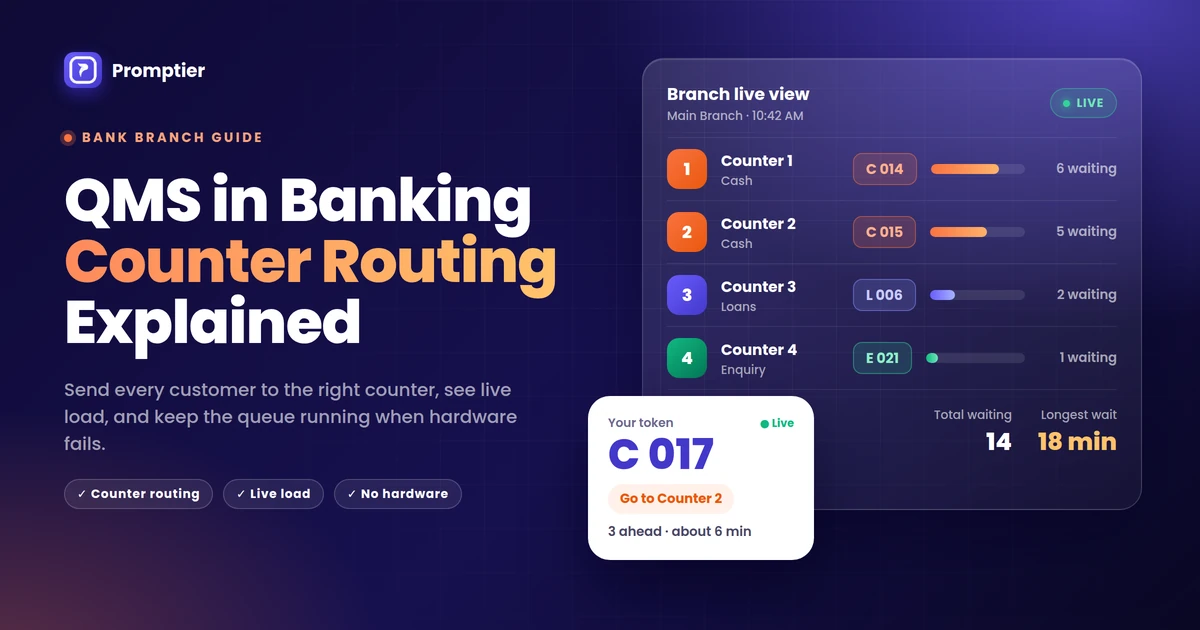
A QMS in banking does one job a token dispenser can’t: it sends each customer to the counter that can actually serve them, and shows the branch manager where the pressure is building. That job is called counter routing, and it’s the difference between a branch that runs on time and one where a two minute passbook update waits behind a forty minute loan file.
If you manage a branch, you’ve seen it. It’s 11 in the morning, 18 people are waiting, and two of your four counters are stuck with long cases while the others have nothing to do. The customers don’t know who is next, and neither do you.
This guide explains how counter routing works, what real time load visibility gives a branch manager, and what happens to your queue when the hardware fails.
A QMS in banking (queue management system) issues each customer a token for a specific service, such as cash, loans or enquiry, and routes them to the counters that handle that service. It shows the branch manager live load per counter, so staff can be moved before a line builds up. A browser based bank QMS runs on phones, laptops and TVs the branch already has, so there’s no dispenser to jam and no single machine whose failure stops the queue.
Key Takeaways
- Counter routing splits one branch line into service queues, so quick transactions don’t wait behind long ones.
- Real time load visibility shows how many people are waiting at each counter and for how long, which turns guesswork into staffing decisions.
- A token dispenser is a single point of failure. When it jams, the whole queue falls back to a crowd at the counters.
- A browser based bank QMS has no dispenser at the counter to fail. Its weak points are the internet and staff devices, and both have simple fallbacks.
- Every token is timestamped, which gives the branch an audit trail for disputes and real data on waits and peak hours.
What Is QMS in Banking?
QMS in banking is software, sometimes with hardware, that manages how customers wait and get served in a bank branch. It issues tokens, places each customer in the right queue for their service, calls them to a counter and records each step.
A basic system just prints numbers. A modern bank QMS adds three things: routing by service, live visibility for the manager, and a timestamped record of every visit.
Key terms used in this guide:
- Service category: the reason for the visit, such as cash, loans, account opening or enquiry.
- Counter routing: sending each token to the counters that handle its service category.
- Load per counter: how many customers are waiting for a counter or group of counters, and how long they’ve been waiting.
- Audit trail: a timestamped record of when each token was issued, called and served.
Why One Line Doesn’t Work in a Bank Branch
A branch handles very different jobs at the same time. A cash deposit or passbook update takes a couple of minutes. A home loan query, a KYC update with document checks, or an account opening can take 20 minutes or more.
Put all of those in one line and three things happen:
- Quick jobs inherit long waits. The customer depositing ₹5,000 waits behind someone opening a joint account with nominee forms.
- Counters sit idle while the lobby fills. The cash counter is free, but the next token in line is a loan enquiry it can’t handle.
- Nobody can give a real wait estimate. The wait depends on what the people ahead of you came for, and a single line hides that.
Counter routing fixes the structure of the queue, not the speed of your staff. That’s why it usually shortens waits without adding people.
Counter Routing Explained
Counter routing means every token belongs to a service, and every counter knows which services it handles.
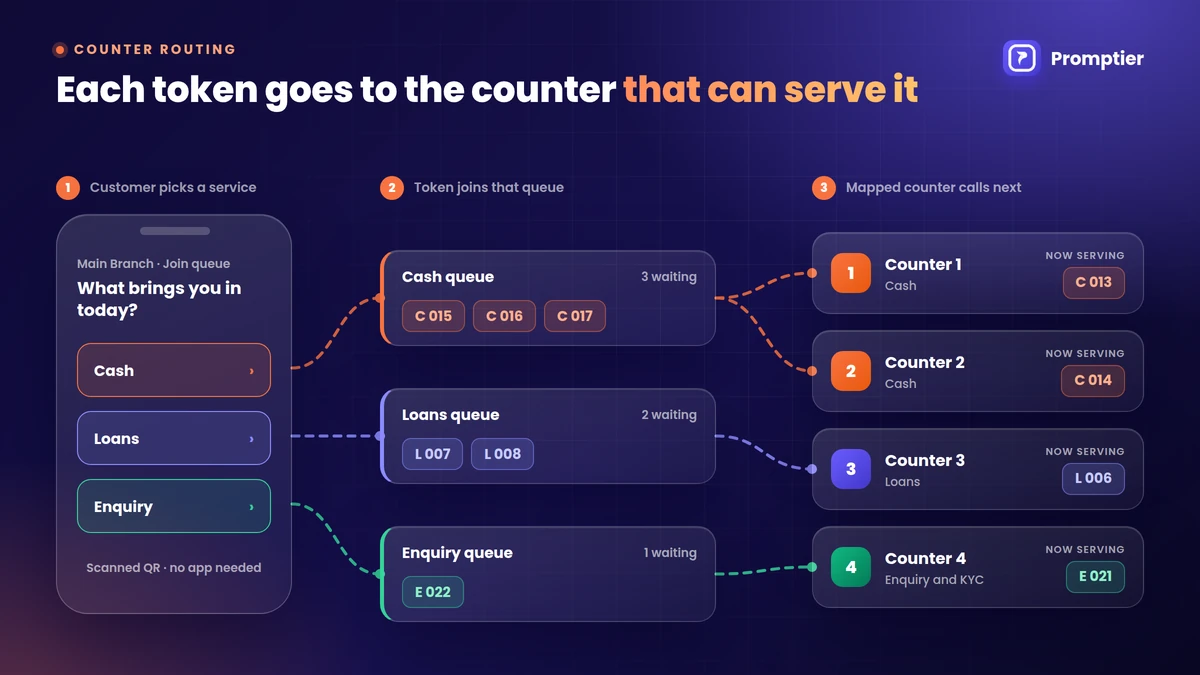
How it works, step by step
- The customer chooses a service when they join, by scanning a QR code at the entrance or at the enquiry desk. For example: Cash, Loans or Enquiry.
- The QMS issues a token for that service, such as C 014 for cash or L 006 for loans.
- The token joins that service’s queue, not one general line.
- Counters are mapped to services. Counters 1 and 2 take cash, Counter 3 takes loans, Counter 4 takes enquiry.
- When an officer taps “call next”, the QMS calls the next token in the queues that counter handles, and the lobby display shows which counter to go to.
- Each step is timestamped, from joining to being called to being served.
Setting up routing for your branch
Start with the services that make up most of your footfall, and map them to counters. A typical branch might look like this:
| Service | Typical visit | Counters | Why it’s separate |
|---|---|---|---|
| Cash (deposits, withdrawals, passbook) | A few minutes | 1 and 2 | High volume, short jobs. Keeps the fast line fast. |
| Loans and credit | 15 to 30 minutes | 3 | Long consultations. Stops them blocking cash. |
| Account opening and KYC | 10 to 20 minutes | 4 | Document heavy. Needs a trained officer. |
| Enquiry and service requests | 5 to 10 minutes | 4, or the enquiry desk | Mixed jobs. Can share with account opening. |
Keep it simple at first. Three or four service categories are enough for most branches. You can split further once you see the data.
When a counter closes or an officer steps away
This is where routing earns its keep. If the loans officer goes to a meeting, you reassign the loans queue to another counter from the dashboard. The waiting customers keep their place and their token, and the display simply sends them to the new counter. With a paper dispenser, the same change means announcing it across the lobby and hoping everyone hears.
Priority customers
Many branches serve senior citizens, differently abled customers or high value account holders on priority. A simple way to handle this is a separate service category, such as “Senior citizens”, mapped to a counter that calls it first. It’s visible, fair and recorded, instead of being decided by whoever reaches the counter first.
Real Time Load Visibility
Counter routing organises the queue. Real time load visibility tells you what’s happening in it.
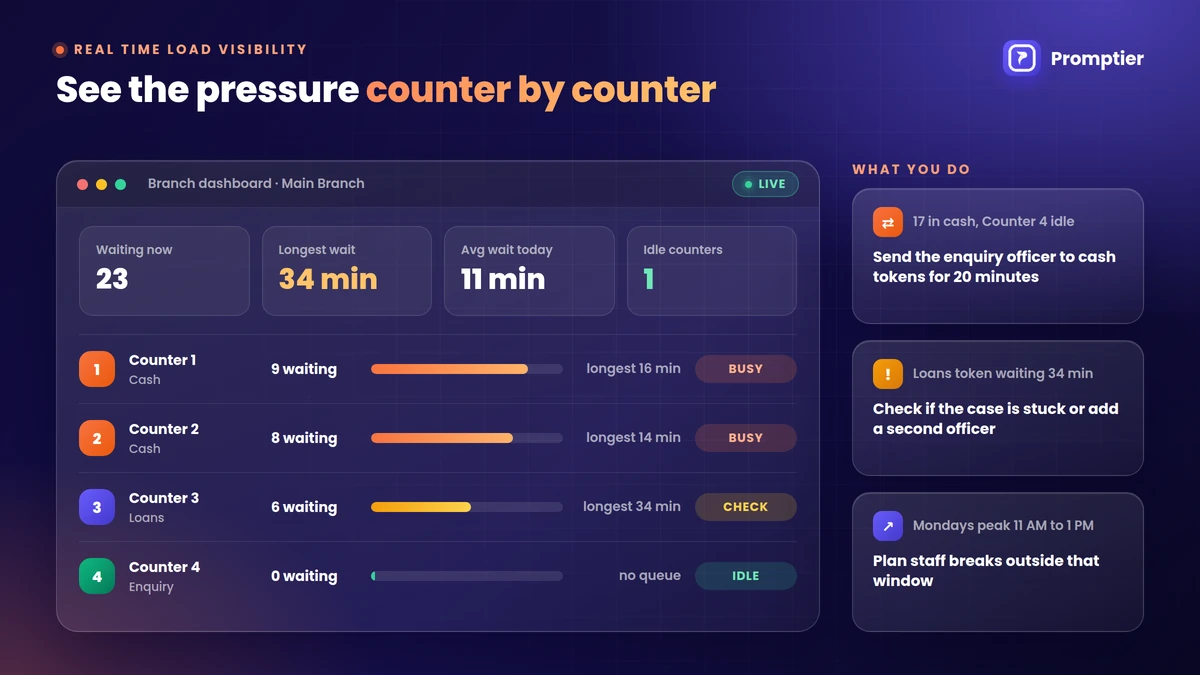
A bank QMS dashboard shows, for each counter or service:
- How many customers are waiting right now
- How long the longest wait has been
- Average wait and service time so far today
- Which counters are busy and which are idle
The point isn’t the numbers themselves. It’s what you do with them:
| What you see | What you do |
|---|---|
| Cash queue at 12 waiting, loans at 1 | Ask the enquiry officer to take cash tokens for 20 minutes |
| One token waiting 35 minutes for loans | Check if the case is stuck, or bring in a second officer |
| Every Monday 11 AM to 1 PM spikes | Schedule breaks outside that window |
| Month end salary days double the cash queue | Open an extra cash counter on those days |
For area and regional managers, the same view across branches shows which branches are under pressure, so staffing decisions are based on data rather than complaints. This is how the Promptier bank queue system works: live load per counter for the branch, and a unified multi branch dashboard above it.
The Hardware Failure Scenario
Every branch manager should ask one question before choosing a QMS: what happens when it breaks?
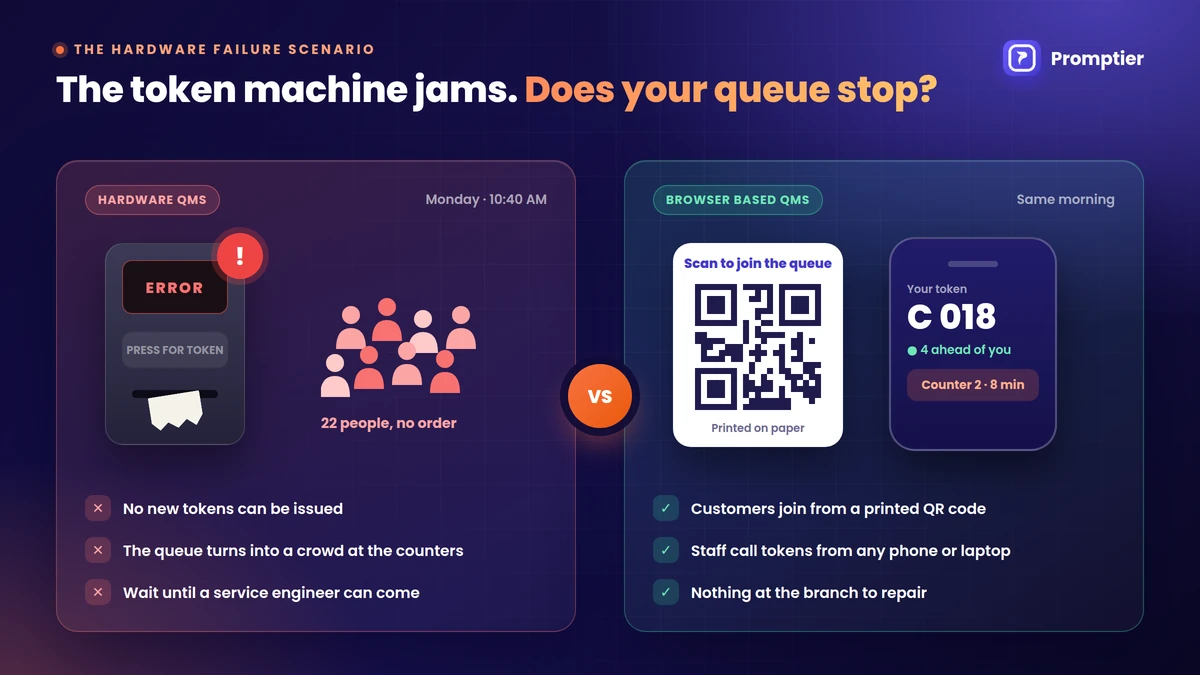
A Monday morning with a hardware QMS
It’s 10:40 on a Monday. The lobby has 22 people. The token dispenser prints a slip halfway and jams. Nobody else can get a token.
Within minutes, the queue turns back into a crowd around the counters. Staff start taking people by memory. Two customers argue about who came first. The display still shows the last number called, so people keep waiting for a token that will never be called. The service engineer can come tomorrow.
A hardware QMS depends on the dispenser, the printer, the display controller and the cabling between them. If any one of them fails, the whole queue stops.
The same morning with a browser based QMS
There’s no dispenser to jam. Customers join by scanning a QR code printed on paper. The queue lives on a server, not in a box at the door.
A browser based bank QMS does have its own weak points. Here’s how each one plays out:
| What fails | Hardware QMS | Browser based QMS (Promptier) |
|---|---|---|
| Token dispenser jams or runs out of paper | Queue stops. No new tokens. | Not applicable. Customers scan a printed QR code. |
| Lobby display fails | Customers can’t see which number is called | Customers see their position and get called on their phone |
| A counter PC fails | That counter may lose its calling unit | The officer logs in on a phone or another laptop |
| Branch internet goes down | Usually unaffected | New joins pause until it’s back. Use a paper register as a short fallback. |
| Repair | Wait for a vendor engineer | Nothing to repair at the branch |
The honest summary: a browser based QMS removes the most common failure, the machine at the door, and turns the rest into problems a branch can solve on the spot. Keep a simple paper register at the enquiry desk for internet outages, and make sure every counter officer can log in from their phone.
What to Look For in a QMS for Banks
Use this list when you compare options:
- Routing by service category, with counters mapped to one or more services
- Reassigning a queue to another counter in seconds, without customers losing their place
- Live load per counter that the branch manager can see from their own desk or phone
- Customers see their own position and estimated wait, so they aren’t crowding the counters
- No single point of failure at the branch, such as one dispenser that stops everything
- Timestamped records of every token, for disputes and audits
- A multi branch view for area and regional managers
- Runs on existing devices, so there’s no vendor installation or hardware contract
How Promptier Works for Bank Branches
Promptier is a queue management system for banks that runs on the phones, laptops and screens a branch already has.
- Counter routing. Cash, loans and enquiry customers are routed to the right counters.
- Live load per counter. Branch managers see who’s waiting and where, as it happens.
- QR check in, no app. Customers scan at the entrance and join from their phone browser.
- Every entry timestamped. Disputes like “my token was skipped” can be checked against the record.
- Multi branch dashboard. Area and regional managers get one view across branches.
- No hardware. Nothing to install, service or repair at the branch.
- Pricing. Free to start. Pro is ₹499 per month per branch. Multi branch networks get custom Enterprise pricing.
If you’re still running a token dispenser, see how to replace your bank’s token machine with a digital system, or the side by side guide to digital queue management vs paper tokens.
See how Promptier’s bank queue system works
Frequently Asked Questions
What is QMS in banking?
QMS in banking is a queue management system that issues tokens to branch customers, places each one in the right queue for their service, calls them to a counter and records every step. Modern systems add counter routing, live load visibility for managers and a timestamped audit trail.
What is counter routing in a bank QMS?
Counter routing means each token belongs to a service, such as cash, loans or enquiry, and each counter is mapped to the services it handles. When an officer calls the next customer, the QMS picks the next token from those queues, so quick jobs don’t wait behind long ones.
How does real time load visibility help a branch manager?
It shows how many customers are waiting at each counter, how long the longest wait is, and which counters are idle. The manager can move an officer, open another counter or reschedule breaks before the lobby gets crowded.
What happens if the token machine breaks in a bank?
With a hardware QMS, new customers can’t get tokens and the queue falls back to a crowd at the counters until a service engineer fixes it. A browser based QMS has no dispenser to break, because customers join by scanning a printed QR code.
Does a browser based bank QMS work without internet?
No. New customers can’t join while the branch internet is down. Keep a paper register at the enquiry desk as a short fallback, and let staff log in from their phones on mobile data if the branch connection drops.
Can a bank QMS handle senior citizens on priority?
Yes. A simple approach is a separate service category for senior citizens, mapped to a counter that calls it first. The priority is visible and recorded, rather than decided at the counter.
How much does a queue management system for banks cost?
Hardware systems cost a dispenser, a display and servicing for every branch. Promptier is free to start, its Pro plan costs ₹499 per month per branch, and multi branch networks can ask for custom Enterprise pricing.
Conclusion
A branch doesn’t get faster by asking officers to work faster. It gets faster when each customer goes to the right counter, when the manager can see where the pressure is, and when the queue doesn’t stop because one machine jammed.
That’s what a QMS in banking should do: route by service, show live load per counter, and keep working when something breaks. If your current system can’t do all three, it’s worth seeing what can.
See it in your branch. Explore Promptier’s bank queue management system and book a free demo. No hardware, no customer app, support in IST hours.
Related reading
Leave a Reply